# 線型代数学

## ベクトル

 ベクトルとは、一般的には「大きさと向きをもつ量」であり「矢印で表すことのできる量」である。

![image.png](https://class.illogic.games/uploads/images/gallery/2026-06/scaled-1680-/CPXimage.png)

 ２次元のベクトルは２つの成分（***x***, ***y***）があり、3次元の場合は３の成分（***x***, ***y***, ***z***）がある。Unityでは `Vector2` と `Vector3` の構造体があり、それぞれのベクトルを作成ができる。

```c#
Vector2 vec2D = new Vector2(vx, vy);     // vxとvyはfloatである
Vector3 vec3D = new Vector3(vx, vy, vz); // vzもfloatである
```

 ゲームの中で、ベクトルをよく使うものである。例えば、3D空間で、キャラクターの速度が「左向き：秒速2メートル、前方：秒速10メートル」であるとしたら…

```c#
// 3D空間だと、x:左右、y:上下、z:前後
Vector3 velocity = new Vector3(-2, 0, 10);
```

 また、ゲームの場合は、向きと量はもちろんそうであるが、その他に「位置」もベクトルで表現する。

```c#
// プレーヤーはシーンの中心点から前方100メートルにいる
Vector3 playerPosition = new Vector3(0, 0, 100);
```

### 演算

 やはり、ベクトルは重要なので、ベクトルの演算を学ばないといけない。

#### 加算

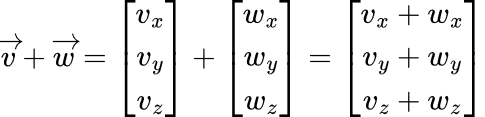
 ２つのベクトルを足すことができる。その結果は各成分の足し算である：

<span style="text-decoration: underline;">2次元の場合</span>：

<table border="1" id="bkmrk--1" style="border-collapse: collapse; width: 100%; border-width: 1px; background-color: rgb(255, 255, 255);"><colgroup><col style="width: 99.881%;"></col></colgroup><tbody><tr><td>![image.png](https://class.illogic.games/uploads/images/gallery/2026-06/scaled-1680-/7NHimage.png)

</td></tr></tbody></table>

<span style="text-decoration: underline;">3次元の場合</span>：

<table border="1" id="bkmrk--2" style="border-collapse: collapse; width: 100%; border-width: 1px; background-color: rgb(255, 255, 255);"><colgroup><col style="width: 99.881%;"></col></colgroup><tbody><tr><td>![image.png](https://class.illogic.games/uploads/images/gallery/2026-06/scaled-1680-/5B0image.png)

</td></tr></tbody></table>

Unityでは「+」の演算子で２つのベクトルを足すことができる

```c#
Vector3 v = new Vector3(vx, vy, vz); // vx, vyとvzは何かのfloat型の数値
Vector3 w = new Vector3(wx, wy, wz); // wx, wyとwzは何かのfloat型の数値
Vector3 vw = v + w;
```

 幾何学的に、足し算は２つの矢印を連続し、1つ目のベクトルの始点から２つ目のベクトルの終点までに新しいベクトルを作成するイメージ：

![image.png](https://class.illogic.games/uploads/images/gallery/2026-06/scaled-1680-/Zkjimage.png)

#### 減算

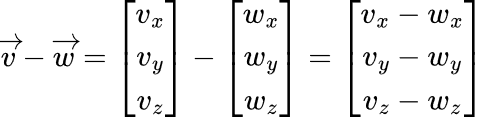
 引き算は同じ形で行う：

<table border="1" id="bkmrk--4" style="border-collapse: collapse; width: 100%; border-width: 1px; background-color: rgb(255, 255, 255);"><colgroup><col style="width: 99.881%;"></col></colgroup><tbody><tr><td>[![image.png](https://class.illogic.games/uploads/images/gallery/2026-06/scaled-1680-/bNCimage.png)](https://class.illogic.games/uploads/images/gallery/2026-06/bNCimage.png)

</td></tr></tbody></table>

```c#
Vector3 v = new Vector3(vx, vy, vz); // vx, vyとvzは何かのfloat型の数値
Vector3 w = new Vector3(wx, wy, wz); // wx, wyとwzは何かのfloat型の数値
Vector3 vw = v - w;
```

 幾何学的には、引くベクトルの向きを反転してから連続に繋がる

[![image.png](https://class.illogic.games/uploads/images/gallery/2026-06/scaled-1680-/dn2image.png)](https://class.illogic.games/uploads/images/gallery/2026-06/dn2image.png)

#### 練習

加算と減算を使い、２つのオブジェクトを相対的に移動

- シーンに２つの3Dゲームオブジェクトを追加し、距離的に放してください。 
    - 1つ目の名前は「Control」
    - 2つ目の名前は「Follower」
- スクリプト「VectorTest」を作成し… 
    - Follower と Control の相対位置を求める（減算）
    - Control をシーン内で動かしたら、Follower が移動を真似する（加算）

<details id="bkmrk-%E3%82%B9%E3%82%AF%E3%83%AA%E3%83%97%E3%83%88%EF%BC%9Avectortest-%2F%2F-"><summary>スクリプト：VectorTest</summary>

```c#
// ベクトル演算の練習」
public class VectorTest : MonoBehaviour
{
    // 移動すべきのオブジェクト
    [SerializeField] private GameObject control;

    // controlを追跡するオブジェクト
    [SerializeField] private GameObject follower;

    // controlとfollowerの相対位置
    private Vector3 relativePosition;
    
    private void Start()
    {
        // 初期位置を取得
        var v = control.transform.position;
        var w = follower.transform.position;
        
        // 相対位置を計算（減算で）
        relativePosition = w - v;
    }

    private void Update()
    {
        // followerの位置が、controlの位置 + 相対位置
        follower.transform.position = 
            control.transform.position + relativePosition;
    }
}
```

</details>#### 実数との掛け算、割り算

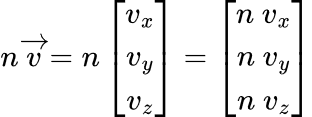
 ベクトルを実数との掛け算ができる。各成分との掛け算になる：

<table border="1" id="bkmrk--6" style="border-collapse: collapse; width: 100%; border-width: 1px; background-color: rgb(255, 255, 255);"><colgroup><col style="width: 99.881%;"></col></colgroup><tbody><tr><td>![image.png](https://class.illogic.games/uploads/images/gallery/2026-06/scaled-1680-/y4fimage.png)

</td></tr></tbody></table>

Unityでは、普通の掛け算演算子「\*」で計算できる：

```c#
Vector3 v = new Vector3(vx, vy, vz); // vx, vyとvzは何かのfloat型の数値
Vector3 nv = v * n;                  // nは何かの実数(float)である
```

#### 練習

先ほど作った「VectorTest」を更新し、相対位置の「倍率（scale）」を Inspector で変えられるようにする。

<details id="bkmrk-%E3%82%B9%E3%82%AF%E3%83%AA%E3%83%97%E3%83%88%EF%BC%9Avectortest-%2F%2F--1"><summary>スクリプト：VectorTest</summary>

```c#
// ベクトル演算の練習」
public class VectorTest : MonoBehaviour
{
    // 移動すべきのオブジェクト
    [SerializeField] private GameObject control;

    // controlを追跡するオブジェクト
    [SerializeField] private GameObject follower;

    // 相対位置の倍率
    [SerializeField] private float scale = 1;
    
    // controlとfollowerの相対位置
    private Vector3 relativePosition;
    
    private void Start()
    {
        // 初期位置を取得
        var v = control.transform.position;
        var w = follower.transform.position;
        
        // 相対位置を計算（減算で）
        relativePosition = w - v;
    }

    private void Update()
    {
        // 倍率を適用する
        Vector3 scalePos = relativePosition * scale;
        
        // followerの位置が、controlの位置 + 相対位置
        follower.transform.position = 
            control.transform.position + scalePos;
    }
}
```

</details>### ベクトルの長さ

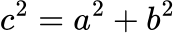
場合により、ベクトルの長さを求めたいときもある。これには「ピタゴラスの定理」（三平方の定理）を利用する。ピタゴラスの定理を思い出しましょう。直角三角形があれば…

![image.png](https://class.illogic.games/uploads/images/gallery/2026-06/scaled-1680-/Lvbimage.png)

***c*** 辺の長さは：

<table border="1" id="bkmrk--8" style="border-collapse: collapse; width: 100%; border-width: 1px; background-color: rgb(255, 255, 255);"><colgroup><col style="width: 99.881%;"></col></colgroup><tbody><tr><td>![image.png](https://class.illogic.games/uploads/images/gallery/2026-06/scaled-1680-/cNjimage.png)

</td></tr></tbody></table>

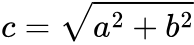
つまり…

<table border="1" id="bkmrk--9" style="border-collapse: collapse; width: 100%; border-width: 1px; background-color: rgb(255, 255, 255);"><colgroup><col style="width: 99.881%;"></col></colgroup><tbody><tr><td>![image.png](https://class.illogic.games/uploads/images/gallery/2026-06/scaled-1680-/so8image.png)

</td></tr></tbody></table>

これはベクトルの成分とよく似ているので：

![image.png](https://class.illogic.games/uploads/images/gallery/2026-06/scaled-1680-/Py8image.png)

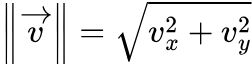
これができる！

<table border="1" id="bkmrk--11" style="border-collapse: collapse; width: 100%; border-width: 1px; background-color: rgb(255, 255, 255);"><colgroup><col style="width: 99.881%;"></col></colgroup><tbody><tr><td>![image.png](https://class.illogic.games/uploads/images/gallery/2026-06/scaled-1680-/r41image.png)

</td></tr></tbody></table>

ここで || v || はベクトルの「ノルム」といわれ、ベクトルの長さを表している。Unityでは、Vectorの便利な「magnitude」がある：

```c#
Vector2 p = new Vector2(3, 4);
float len = p.magnitude; // len は p の長さ（5）である
```

### 単位ベクトル

 ベクトルの長さを「1」にすると、そのベクトルは単位円の中に入り、各成分がsinとcosを一致させることができる。その他にも、ベクトルの長さを調整する前に、まず長さを1に戻さないといけないが必要である。その場合は単位ベクトルを求めないといけない。

![image.png](https://class.illogic.games/uploads/images/gallery/2026-06/scaled-1680-/kvfimage.png)

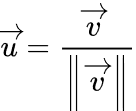
 単位ベクトルを求めるのは、ベクトルをノルムで割るだけ：

<table border="1" id="bkmrk--13" style="border-collapse: collapse; width: 100%; border-width: 1px; background-color: rgb(255, 255, 255);"><colgroup><col style="width: 99.881%;"></col></colgroup><tbody><tr><td>![image.png](https://class.illogic.games/uploads/images/gallery/2026-06/scaled-1680-/bMBimage.png)

</td></tr></tbody></table>

Unityでは「normalized」というプロパティーで単位ベクトルを求めることができる。

```c#
// 任意の長さのベクトル v があるとして：
Vector3 v = new Vector3(30, 12, -15);

// uはvと同じ向き（方向）であるが、長さは「1」である（単位ベクトル）
Vector3 u = v.normalized;
```

### ベクトル同士の”掛け算”（内積と外積）

 ベクトル同士の掛け算はできないが、２つの特別な関数がある。内積（dot product）と外積（cross product）。それぞれは限られた使い方があるが、必要な時にとても便利である。

#### 内積

 内積の定義は以下の通りになる：

![image.png](https://class.illogic.games/uploads/images/gallery/2026-06/scaled-1680-/OQyimage.png)

<table border="1" id="bkmrk--15" style="border-collapse: collapse; width: 100%; border-width: 1px; background-color: rgb(255, 255, 255); height: 30.8667px;"><colgroup><col style="width: 99.881%;"></col></colgroup><tbody><tr style="height: 30.8667px;"><td style="height: 30.8667px;">![image.png](https://class.illogic.games/uploads/images/gallery/2026-06/scaled-1680-/0g7image.png)

</td></tr></tbody></table>

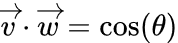
 ある２つのベクトル「v」と「w」の内積は、それぞれのベクトルのノルム（長さ）とその２つのベクトルの間の角度のコサインの掛け算である。答えは実数である。

 これは何に便利かというと、２つのベクトルの間の角度を求めたいなら、内積を使えば良いでしょう。まず、vとwを単位ベクトルにすると、長さは1になるので、式は単純になる：

<table border="1" id="bkmrk--16" style="border-collapse: collapse; width: 100%; border-width: 1px; background-color: rgb(255, 255, 255);"><colgroup><col style="width: 99.881%;"></col></colgroup><tbody><tr><td>![image.png](https://class.illogic.games/uploads/images/gallery/2026-06/scaled-1680-/Jtsimage.png)

</td></tr></tbody></table>

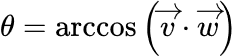
そして、角度を求めるのは：

<table border="1" id="bkmrk--17" style="border-collapse: collapse; width: 100%; border-width: 1px; background-color: rgb(255, 255, 255);"><colgroup><col style="width: 99.881%;"></col></colgroup><tbody><tr><td>![image.png](https://class.illogic.games/uploads/images/gallery/2026-06/scaled-1680-/fcLimage.png)

</td></tr></tbody></table>

<span class="c5">Unityで内積の計算を実装されている：</span>

```c
Vector3 v = new Vector3(vx, vy, vz);
Vector3 w = new Vector3(wx, wy, wz);
float dot = Vector3.Dot(v, w); // 内積

// 角度を求めたいなら
float radians = Mathf.Acos(dot);

// そして
float angle = radians * Mathf.Rad2Deg;
```

##### 練習

警備員の視野を利用するゲーム

- 警備員は「視野」があり、前方±角度しか見えない
- 泥棒が視野の中に入ってれば→発見！

<details id="bkmrk-%E8%AD%A6%E5%82%99%E5%93%A1%E3%81%AE%E3%82%B9%E3%82%AF%E3%83%AA%E3%83%97%E3%83%88-%2F%2F-%E8%AD%A6%E5%82%99%E5%93%A1%E3%81%AE%E5%89%8D%E3%81%AB%E6%B3%A5"><summary>警備員のスクリプト</summary>

```c#
// 警備員の前に泥棒がいるかいないか確認する
public class GuardMan : MonoBehaviour
{
    // 泥棒への向きが欲しいので、泥棒が必要
    [SerializeField]
    private GameObject thief;
    
    // 視野（度）
    [SerializeField]
    private float viewAngle;

    // 色を変えるため
    private MeshRenderer rend;
    
    private void Start()
    {
	    rend = GetComponent<MeshRenderer>();
    }

    private void Update()
    {
        // 警備員の前向きのベクトル
        Vector3 v = transform.forward; // 青い矢印のこと

        // 泥棒への向き
        Vector3 w = thief.transform.position - transform.position;

        // 単位ベクトルにする
        w.Normalize();

        // 内積で角度のコサインを求める
        float dot = Vector3.Dot(v, w);
        
        // 内積からラジアン角度を求める
        float radian = Mathf.Acos(dot);
        
        // 度に変換
        float angle = radian * Mathf.Rad2Deg;
        
        // 警備員と泥棒の角度が視野よりも小さければ、発見！
        if (angle < viewAngle)
            rend.material.color = Color.red;
        
        // 見えない
        else
            rend.material.color = Color.green;
    }
}
```

</details>#### 外積

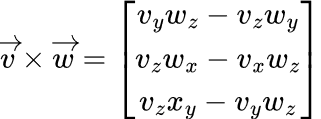
<span class="c5">２つのベクトル外積の式は以下の通りである：</span>

<table border="1" id="bkmrk--18" style="border-collapse: collapse; width: 100%; border-width: 1px; background-color: rgb(255, 255, 255);"><colgroup><col style="width: 99.881%;"></col></colgroup><tbody><tr><td>![image.png](https://class.illogic.games/uploads/images/gallery/2026-06/scaled-1680-/jp7image.png)

</td></tr></tbody></table>

<span class="c5">そして、Unityでも計算を実装されている：</span>

```c#
Vector3 v = new Vector3(vx, vy, vz);
Vector3 w = new Vector3(wx, wy, wz);
Vector3 cross  = Vector3.Cross(v, w); // 外積の結果は新しいベクトルである
```

<span class="c5"> 式よりも、外積の幾何学的な意味は重要。2つの3Dベクトル「v」と「w」は平面を定義すし、それで「v」と「w」の外積の結果は：</span>

- <span class="c5">新しい3Dベクトルである</span>
- <span class="c46 c93 c41">このベクトル「v」と「w」で定義された平面を直交する</span>
- <span class="c5">また、長さは</span>

<table border="1" id="bkmrk--19" style="border-collapse: collapse; width: 100%; border-width: 1px; background-color: rgb(255, 255, 255);"><colgroup><col style="width: 99.881%;"></col></colgroup><tbody><tr><td>![image.png](https://class.illogic.games/uploads/images/gallery/2026-06/scaled-1680-/gQTimage.png)

</td></tr></tbody></table>

![image.png](https://class.illogic.games/uploads/images/gallery/2026-06/scaled-1680-/ocximage.png)

<span class="c5">従って、２つのベクトルがあれば、そのベクトルで作られた「面」を直交するベクトルを求めることができる。面の「法線ベクトル」、または3D空間の傾きの方向を求めることができる！</span>

## <span class="c5">行列</span>

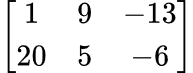
<span class="c5"> 数を縦と横に矩形状に配列したものである。横に並んだ一筋を行(row)、縦に並んだ一筋を列(column)と呼ぶ。例えば、下記のような行列:  
</span>

<table border="1" id="bkmrk--21" style="border-collapse: collapse; width: 100%; border-width: 1px; background-color: rgb(255, 255, 255);"><colgroup><col style="width: 99.881%;"></col></colgroup><tbody><tr><td>![image.png](https://class.illogic.games/uploads/images/gallery/2026-06/scaled-1680-/BBaimage.png)

</td></tr></tbody></table>

<span class="c5">は2つの行と3つの列によって構成されているため、(2,3)型または2×3型の行列と呼ばれる。</span><span class="c5">Unity は行列のクラスがないため、自分で作ってみましょう。</span>

#### 練習

「Matrix」クラスを実装して：

- サイズ（行数、列数）を設定できるようにする
- 各要素を（行：ｒ、 列 ｃ） 
    - `float Get(int r, int c)` で取得できるようにする。
    - `void Set(int r, int c, float value)`で代入できるようにする。
- `string ToString();` のメソッドを実装し、中身を文字列として返すようにする

最後に、TestMatrix スクリプトを作成し、操作を確認してください。

<span style="text-decoration: underline;">**補足：C#の1次元の配列を2次元の行列へ**</span>

<span class="c5"> 行列は「行」と「列」２次元があるが、C#の配列は１次元しかない。２次元の行列を作成するため、以下の変換を行わないといけない：</span>`<span class="c5">int i = r * cols + c;</span>`

<span class="c5">ここで、</span>

- <span class="c5">i = １次元（配列）の指数</span>
- <span class="c5">r = 行列の「行」</span>
- <span class="c5">c = 行列の「列」</span>
- <span class="c5">cols = 行列の列数  
    </span>

<span class="c5">例えば、4×3の行列で「 列:3、行:2」の要素を求めたい。ならば…</span>

![image.png](https://class.illogic.games/uploads/images/gallery/2026-06/scaled-1680-/SUrimage.png)

- c = 2
- r = 1
- cols = 4
- i = r \* cols + c = 1 \* 4 + 2 = **6**

<details id="bkmrk-matrix-%E3%82%AF%E3%83%A9%E3%82%B9-%2F%2F-%E8%A1%8C%E5%88%97%E3%82%AF%E3%83%A9%E3%82%B9-"><summary>Matrix クラス</summary>

```c#
// 行列クラス
public class Matrix 
{
	// 列の数
	private int rows;

	// 行の数
	private int cols;

	// 行列の数値（配列）
	private float[] data;

	// コンストラクタ（インスタンスする時に呼び出す）
	// rows: 行の数
	// cols: 列の数
	public Matrix(int rows, int cols)
	{
		this.cols = cols;
		this.rows = rows;

		data = new float[cols * rows];
	}

	// 数値を読む
	// r: 行
	// c: 列
	// 行列の数値を返す
	public float Get(int r, int c) 
	{
		// 配列の位置（指数）を計算
		int i = r * cols + c;;
		return data[i];
	}
	
	// 数値を代入
	// r: 行
	// c: 列
	// value:代入したい数値
	public void Set(int r, int c, float value)
	{
		// 配列の位置（指数）を計算
		int i = r * cols + c;

		// 代入
		data[i] = value;
	}

	// 文字列にする
	public override string ToString()
	{
		// 表示用の文字列
		string s = "";

		// 1行ずつ
		for (int j = 0; j < rows; j++)
		{
			// 1列ずつ
			for (int i = 0; i < cols; i++)
			{
				// 数値を取得
				float v = Get(j, i);
				
				// 数値を文字列にして、連結する
				s += $"{v:0.00}  ";
			}

			// 改行
			s += "\n";
		}

		// 返す
		return s;
	}
}
```

</details><details id="bkmrk-testmatrix-%E3%82%B9%E3%82%AF%E3%83%AA%E3%83%97%E3%83%88-%2F%2F-"><summary>TestMatrix スクリプト</summary>

```c#
// 行列を確認するため
public class MatrixTest : MonoBehaviour
{
	private void Start()
	{
		PrintMatrix();
    }

    private void PrintMatrix()
	{
		Matrix m = new Matrix(2, 3);
		
		m.Set(0, 0, 1);
		m.Set(0, 1, 9);
		m.Set(0, 2, -13);
		
		m.Set(1, 0, 20);
		m.Set(1, 1, 5);
		m.Set(1, 2, -6);

        // ToString() を実装したので、自動的に文字列に変換される
		Debug.Log(m);
	}
}
```

</details>### 足し算（加法）

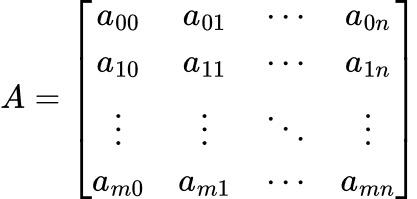
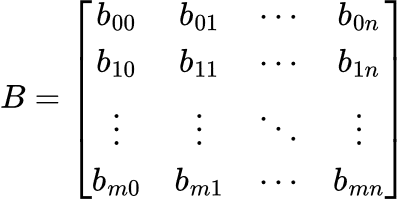
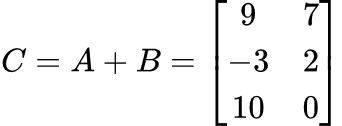
<span class="c5"> ２つの行列「A」と「B」、「A」と「B」のサイズが「m × n」である場合、A+Bの結果行列「C」は、各要素の足し算である。</span>

<table border="1" id="bkmrk--23" style="border-collapse: collapse; width: 100%; border-width: 1px; background-color: rgb(255, 255, 255); height: 360.217px;"><colgroup><col style="width: 50.0397%;"></col><col style="width: 50.0397%;"></col></colgroup><tbody><tr style="height: 214.9px;"><td style="height: 214.9px;">![image.png](https://class.illogic.games/uploads/images/gallery/2026-06/scaled-1680-/jRGimage.png)

</td><td style="height: 214.9px;">![image.png](https://class.illogic.games/uploads/images/gallery/2026-06/scaled-1680-/yhyimage.png)

</td></tr><tr style="height: 145.317px;"><td colspan="2" style="height: 145.317px;">![image.png](https://class.illogic.games/uploads/images/gallery/2026-06/scaled-1680-/eJoimage.png)

  
</td></tr></tbody></table>

もっと簡単にすると、各要素 ***c<sub>ij</sub>*** の値は：

<table border="1" id="bkmrk--24" style="border-collapse: collapse; width: 100%; height: 29.0667px; border-width: 1px; background-color: rgb(255, 255, 255);"><colgroup><col style="width: 99.881%;"></col></colgroup><tbody><tr style="height: 29.0667px;"><td style="height: 29.0667px;">![image.png](https://class.illogic.games/uploads/images/gallery/2026-06/scaled-1680-/fqUimage.png)

</td></tr></tbody></table>

ここで「i」は「行」と「j」は「列」とする

#### 練習

「Matrix」クラスを拡張して：

- `Matrix Sum (Matrix b)` を追加し、加法を実装する
- 自分と渡された行列「b」を足し、新しい行列を返す
- 行数、または列数が合わない場合は `Debug.LogError` でエラーを表示し、null を返す

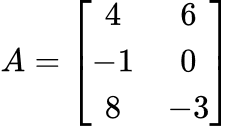
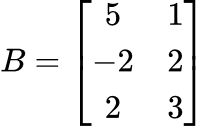
TestMatrix を更新し、以下の２つの行列を足してください。

<table border="1" id="bkmrk--25" style="border-collapse: collapse; width: 100%; border-width: 1px; background-color: rgb(255, 255, 255);"><colgroup><col style="width: 50.0397%;"></col><col style="width: 50.0397%;"></col></colgroup><tbody><tr><td class="align-center">![image.png](https://class.illogic.games/uploads/images/gallery/2026-06/scaled-1680-/jS5image.png)

</td><td class="align-center">![image.png](https://class.illogic.games/uploads/images/gallery/2026-06/scaled-1680-/JVoimage.png)

</td></tr><tr><td class="align-center" colspan="2">![image.png](https://class.illogic.games/uploads/images/gallery/2026-06/scaled-1680-/I4Limage.png)

</td></tr></tbody></table>

<details id="bkmrk-sum-%E3%83%A1%E3%82%BD%E3%83%83%E3%83%89-%2F%2F-%E8%A1%8C%E5%88%97%E3%81%AE%E5%8A%A0%E7%AE%97-pu"><summary>Sum メソッド</summary>

```c#
// 行列の加算
public Matrix Sum(Matrix b)
{
	// 同じサイズかを確認する
	if (cols != b.cols || rows != b.rows)
	{
		Debug.LogError("行列のサイズが合わない");
		return null;
	}

	// 結果の行列
	Matrix result = new Matrix(rows, cols);
	
	// 1行ずつ
	for (int r = 0; r < rows; r++)
	{
		// 1列ずつ
		for (int c = 0; c < cols; c++)
		{
			float va = Get(r, c);      // 自分の数値を求める
			float vb = b.Get(r, c);    // 相手の数値を求める

			result.Set(r, c, va + vb); // 足して、代入
		}
	}

	// 返すだけ
	return result;
}
```

</details><details id="bkmrk-testsum-%E3%83%A1%E3%82%BD%E3%83%83%E3%83%89-void-te"><summary>TestSum メソッド</summary>

```c#
void TestSum()
{
	// 3行2列の行列を作成
	Matrix a = new Matrix(3, 2);

	// 数値を代入
	a.Set(0, 0, 4);
	a.Set(0, 1, 6);
	
	a.Set(1, 0, -1);
	a.Set(1, 1, 0);
	
	a.Set(2, 0, 8);
	a.Set(2, 1, -3);

	Debug.Log(a);

	Matrix b = new Matrix(3, 2);

	b.Set(0, 0, 5);
	b.Set(0, 1, 1);
	
	b.Set(1, 0, -2);
	b.Set(1, 1, 2);
	
	b.Set(2, 0, 2);
	b.Set(2, 1, 3);

	Debug.Log(b);

	// 行列の加算
	Matrix c = a.Sum(b);
	Debug.Log(c);
}
```

</details>### 掛け算（乗法）

<span class="c5"> ２つの行列「A」と「B」をかけることができる。ただし、「A」の列数は「Ｂ」の行数を等しくする条件を満たさないといけない。つまり、「A」は「l × m」であれば、「B」は「m × n」を確かめないといけない。この場合は、結果行列「C」のサイズは「l × n」になる。</span>

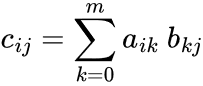
<span class="c5">この場合は、各要素 ***c<sub>ij</sub>*** の掛け算の式は以下にある：</span>

<table border="1" id="bkmrk--26" style="border-collapse: collapse; width: 100%; border-width: 1px; background-color: rgb(255, 255, 255);"><colgroup><col style="width: 99.881%;"></col></colgroup><tbody><tr><td>![image.png](https://class.illogic.games/uploads/images/gallery/2026-06/scaled-1680-/szMimage.png)

</td></tr></tbody></table>

つまり…

![image.png](https://class.illogic.games/uploads/images/gallery/2026-06/scaled-1680-/jM3image.png)

行列「C」の「i, j」要素は、行列「A」の「i行目」× 行列「B」の「j列目」を全て足す結果。例えば：

![image.png](https://class.illogic.games/uploads/images/gallery/2026-06/scaled-1680-/41Pimage.png)

 <span style="color: rgb(224, 62, 45);">**注意：行列の積は可換でない**</span>（行列による変換の話のときに、ここを注意しましょう）

<table border="1" id="bkmrk--29" style="border-collapse: collapse; width: 99.937%; border-width: 1px; background-color: rgb(255, 255, 255);"><colgroup><col style="width: 100%;"></col></colgroup><tbody><tr><td>![image.png](https://class.illogic.games/uploads/images/gallery/2026-06/scaled-1680-/FuEimage.png)

</td></tr></tbody></table>

#### 練習

「Matrix」クラスを拡張して：

- `Matrix Multiply (Matrix b)` を追加し、乗法を実装する
- 自分と渡された行列「b」を足し、新しい行列を返す
- 行数、または列数が合わない場合は `Debug.LogError` でエラーを表示し、null を返す
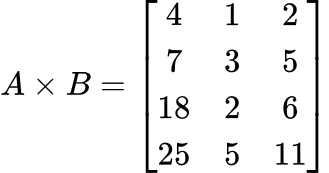
- 上記のAとB行列で確認。結果は：

<table border="1" id="bkmrk--30" style="border-collapse: collapse; width: 100%; border-width: 1px; background-color: rgb(255, 255, 255);"><colgroup><col style="width: 99.881%;"></col></colgroup><tbody><tr><td>![image.png](https://class.illogic.games/uploads/images/gallery/2026-06/scaled-1680-/NOSimage.png)

</td></tr></tbody></table>

<details id="bkmrk-multiply-%E3%83%A1%E3%82%BD%E3%83%83%E3%83%89-%2F%2F-%E8%A1%8C%E5%88%97%E3%81%AE"><summary>Multiply メソッド</summary>

```c#
// 行列の掛け算
public Matrix Multiply(Matrix b)
{
	// 掛け算ができることを確認
	if (cols != b.rows)
	{
		Debug.LogError("行と列の数が一致していない");
		return null;
	}

	// 返す行列（自分の行数 x 相手の列数）
	Matrix result = new Matrix(rows, b.cols);

	// 1行ずつ（結果行列）
	for (int i = 0; i < rows; i++)
	{
		// 1列ずつ（結果行列）
		for (int j = 0; j < b.cols; j++)
		{
			// 1数値ずつ
			float sum = 0;
			for (int k = 0; k < cols; k++)
			{
				sum += Get(i, k) * b.Get(k, j);
			}
			result.Set(i, j, sum);
		}
	}

	return result;
}
```

</details><details id="bkmrk-testmultiply-%E3%83%A1%E3%82%BD%E3%83%83%E3%83%89-vo"><summary>TestMultiply メソッド</summary>

```c#
void TestMultiply()
{
	// 2行3列の行列を作成
	Matrix a = new Matrix(4, 2);

	// 数値を代入
	a.Set(0, 0, 1);
	a.Set(0, 1, 0);
	
	a.Set(1, 0, 3);
	a.Set(1, 1, -1);
	
	a.Set(2, 0, 2);
	a.Set(2, 1, 2);
	
	a.Set(3, 0, 5);
	a.Set(3, 1, 1);
	
	Debug.Log(a);

	Matrix b = new Matrix(2, 3);

	b.Set(0, 0, 4);
	b.Set(0, 1, 1);
	b.Set(0, 2, 2);
	
	b.Set(1, 0, 5);
	b.Set(1, 1, 0);
	b.Set(1, 2, 1);
	
	Debug.Log(b);

	// 行列の掛け算
	Matrix c = a.Multiply(b);
	Debug.Log(c);
}
```

</details>### ベクトルと行列の掛け算


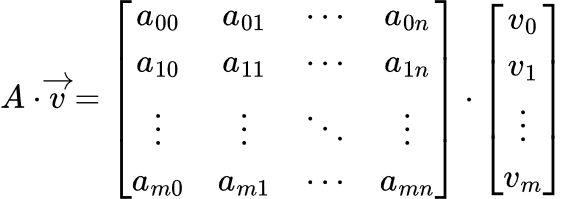
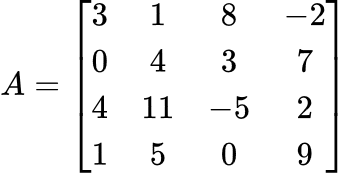
<span class="c5">ベクトルを「m × 1」の行列として扱えば、普段に掛け算ができる：</span>

<table border="1" id="bkmrk--32" style="border-collapse: collapse; width: 100%; border-width: 1px; background-color: rgb(255, 255, 255);"><colgroup><col style="width: 99.881%;"></col></colgroup><tbody><tr><td>![image.png](https://class.illogic.games/uploads/images/gallery/2026-06/scaled-1680-/0Wzimage.png)

</td></tr></tbody></table>

#### 練習

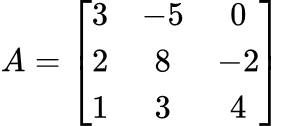
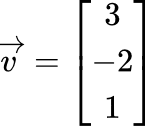
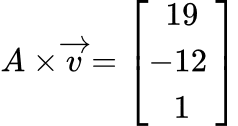
「Matrix」クラスを拡張し、Unityの`Vector3` と `Vector4` と掛け算（乗法）ができるようにする。

- ベクトルを 3x1 または 4x1 の行列にする
- 普通の掛け算を計算
- 出来上がった行列をまたベクトルに変換し、返す

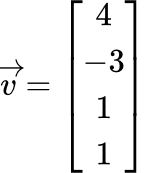
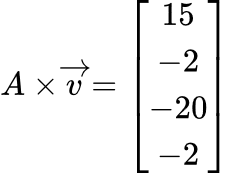
確認用：

<table border="1" id="bkmrk--33" style="border-collapse: collapse; width: 100%; border-width: 1px; background-color: rgb(255, 255, 255);"><colgroup><col style="width: 33.3333%;"></col><col style="width: 33.3333%;"></col><col style="width: 33.3333%;"></col></colgroup><tbody><tr><td class="align-center" style="vertical-align: middle;">![image.png](https://class.illogic.games/uploads/images/gallery/2026-06/scaled-1680-/Ck5image.png)

</td><td class="align-center" style="vertical-align: middle;">![image.png](https://class.illogic.games/uploads/images/gallery/2026-06/scaled-1680-/zDVimage.png)

</td><td class="align-center" style="vertical-align: middle;">![image.png](https://class.illogic.games/uploads/images/gallery/2026-06/scaled-1680-/wNJimage.png)

</td></tr></tbody></table>

<table border="1" id="bkmrk--34" style="border-collapse: collapse; width: 100%; border-width: 1px; background-color: rgb(255, 255, 255);"><colgroup><col style="width: 39.195%;"></col><col style="width: 27.5233%;"></col><col style="width: 33.3592%;"></col></colgroup><tbody><tr><td class="align-center" style="vertical-align: middle;">[![image.png](https://class.illogic.games/uploads/images/gallery/2026-06/scaled-1680-/eISimage.png)](https://class.illogic.games/uploads/images/gallery/2026-06/eISimage.png)

</td><td class="align-center" style="vertical-align: middle;">[![image.png](https://class.illogic.games/uploads/images/gallery/2026-06/scaled-1680-/V7vimage.png)](https://class.illogic.games/uploads/images/gallery/2026-06/V7vimage.png)

</td><td class="align-center" style="vertical-align: middle;">[![image.png](https://class.illogic.games/uploads/images/gallery/2026-06/scaled-1680-/aCdimage.png)](https://class.illogic.games/uploads/images/gallery/2026-06/aCdimage.png)

</td></tr></tbody></table>

<details id="bkmrk-multiply-%E3%83%A1%E3%82%BD%E3%83%83%E3%83%89-%28vecto"><summary>Multiply メソッド (Vector3)</summary>

```c#
// 行列×ベクトルの掛け算
public Vector3 Multiply(Vector3 vector)
{
    // ベクトルを3x1の行列にする
    Matrix b = new Matrix(3, 1);
    b.Set(0, 0, vector.x);
    b.Set(1, 0, vector.y);
    b.Set(2, 0, vector.z);

    // 普通の掛け算
    Matrix c = Multiply(b);

    // cをまたベクトルにする
    Vector3 result = new Vector3();
    result.x = c.Get(0, 0);
    result.y = c.Get(1, 0);
    result.z = c.Get(2, 0);

    return result;
}
```

</details><details id="bkmrk-multiply-%E3%83%A1%E3%82%BD%E3%83%83%E3%83%89-%28vecto-1"><summary>Multiply メソッド (Vector4)</summary>

```c#
// 行列×ベクトルの掛け算
public Vector4 Multiply(Vector4 vector)
{
    // ベクトルを3x1の行列にする
    Matrix b = new Matrix(4, 1);
    b.Set(0, 0, vector.x);
    b.Set(1, 0, vector.y);
    b.Set(2, 0, vector.z);
    b.Set(3, 0, vector.w);

    // 普通の掛け算
    Matrix c = this.Multiply(b);

    // cをまたベクトルにする
    Vector4 result = new Vector4();
    result.x = c.Get(0, 0);
    result.y = c.Get(1, 0);
    result.z = c.Get(2, 0);
    result.w = c.Get(3, 0);

    return result;
}
```

</details><details id="bkmrk-testmultiplyv3-%E3%83%A1%E3%82%BD%E3%83%83%E3%83%89-"><summary>TestMultiplyV3 メソッド</summary>

```c#
private void TestMultiplyV3()
{
    Matrix a = new Matrix(3, 3);
    a.Set(0, 0, 3);
    a.Set(0, 1, -5);
    a.Set(0, 2, 0);
    
    a.Set(1, 0, 2);
    a.Set(1, 1, 8);
    a.Set(1, 2, -2);
    
    a.Set(2, 0, 1);
    a.Set(2, 1, 3);
    a.Set(2, 2, 4);

    Vector3 v = new Vector3(3, -2, 1);
    Vector3 w = a.Multiply(v);
    
    Debug.Log(w);
}
```

</details><details id="bkmrk-testmultiplyv4-%E3%83%A1%E3%82%BD%E3%83%83%E3%83%89-"><summary>TestMultiplyV4 メソッド</summary>

```c#
private void TestMultiplyV4()
{
    Matrix a = new Matrix(4, 4);
    a.Set(0, 0, 3);
    a.Set(0, 1, 1);
    a.Set(0, 2, 8);
    a.Set(0, 3, -2);
    
    a.Set(1, 0, 0);
    a.Set(1, 1, 4);
    a.Set(1, 2, 3);
    a.Set(1, 3, 7);
    
    a.Set(2, 0, 4);
    a.Set(2, 1, 11);
    a.Set(2, 2, -5);
    a.Set(2, 3, 2);

    a.Set(3, 0, 1);
    a.Set(3, 1, 5);
    a.Set(3, 2, 0);
    a.Set(3, 3, 9);
    
    Vector4 v = new Vector4(4, -3, 1, 1);
    Vector4 w = a.Multiply(v);
    
    Debug.Log(w);
}
```

</details>この Matrix クラスを追って、後ほど使うので、大事にしてください～