

# 三角関数

 三角関数とは、平面三角法における、**<span style="color: rgb(22, 145, 121);">角度の大きさ</span>と<span style="color: rgb(22, 145, 121);">線分の長さ</span>の<span style="color: rgb(186, 55, 42);">関係</span>を記述する関数**の族、およびそれらを拡張して得られる関数の総称である。

![image.png](https://class.illogic.games/uploads/images/gallery/2026-06/scaled-1680-/sjBimage.png)

 簡単にいうと、上記の図で

- 角度 **<span style="color: rgb(132, 63, 161);">*θ*</span>** が知っていれば、成分 ***<span style="color: rgb(224, 62, 45);">p<sub>x</sub></span>*** と ***<span style="color: rgb(45, 194, 107);">p<sub>y </sub></span>***の数値は何？
- 成分 ***<span style="color: rgb(224, 62, 45);">p<sub>x</sub></span>*** と ***<span style="color: rgb(45, 194, 107);">p<sub>y </sub></span>***が知っていれば、角度 **<span style="color: rgb(132, 63, 161);">*θ* </span>**はどうなる？

この関係が「三角関数」で求めることができる。

## 「ラジアン」とは

 三角法に由来する三角関数という呼び名のほかに、単位円を用いた定義に由来する円関数という呼び名がある。単位円とは、半径が 1 の円のことである。

![image.png](https://class.illogic.games/uploads/images/gallery/2026-06/scaled-1680-/LbMimage.png)

 円の周囲の長さは ***2πr*** である前提で、今回の半径 ***r*** の長さは「1」であるため、単位円の周囲はちょうど ***2π*** であること証明する。また、円は「度」で分割すると、0度から360度まで表すことができる。従って、次の関係を作ることができる：***2π＝360度***

[![image.png](https://class.illogic.games/uploads/images/gallery/2026-06/scaled-1680-/ysjimage.png)](https://class.illogic.games/uploads/images/gallery/2026-06/ysjimage.png)

 ここで「ラジアン」という新しい角度の測り方を考えることができる。360度 は **2π** ラジアンであるとしたら、「度」から「ラジアン」へ変換にしたいなら：

<table border="1" id="bkmrk--3" style="border-collapse: collapse; width: 100%;"><colgroup><col style="width: 99.881%;"></col></colgroup><tbody><tr><td style="background-color: rgb(255, 255, 255);">![image.png](https://class.illogic.games/uploads/images/gallery/2026-06/scaled-1680-/YGQimage.png)</td></tr></tbody></table>

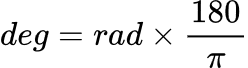
ここで「rad」は「ラジアン」（radians）にし、「deg」は「度」（degrees）である。また、ラジアンから度に変換したいなら：

<table border="1" id="bkmrk--4" style="border-collapse: collapse; width: 100%;"><colgroup><col style="width: 99.881%;"></col></colgroup><tbody><tr><td style="background-color: rgb(255, 255, 255);">![image.png](https://class.illogic.games/uploads/images/gallery/2026-06/scaled-1680-/CDdimage.png)</td></tr></tbody></table>

 の逆計算もできる。例えば、90度をラジアンに変換すると：

<table border="1" id="bkmrk--5" style="border-collapse: collapse; width: 100%; border-width: 1px; background-color: rgb(255, 255, 255);"><colgroup><col style="width: 99.881%;"></col></colgroup><tbody><tr><td>![image.png](https://class.illogic.games/uploads/images/gallery/2026-06/scaled-1680-/vf7image.png)</td></tr></tbody></table>

 90度は約1.57079ラジアンになる。具体的に、図でみると

![image.png](https://class.illogic.games/uploads/images/gallery/2026-06/scaled-1680-/jrtimage.png)

 Unityの多くの関数は「度」(degree)を使うが、これから学ぶ（復習？）三角関数は必ず「ラジアン」を使うので、注意してください。また、UnityのAPIの中でラジアンと度を変換するための定数がすでに定義されている。

```c#
// 度（degree）からラジアン(radian)へ変換する場合
float radian = degree * Mathf.Deg2Rad;
// ラジアン(radian)から度（degree）へ変換する場合
float degree = radian * Mathf.Rad2Deg;
```

## 角度（ラジアン単位）と成分 x, y の関係性

 では、単位円の上にある点 *p=(p<sub>x</sub>,p<sub>y</sub>)* を配置してみましょう：

![image.png](https://class.illogic.games/uploads/images/gallery/2026-06/scaled-1680-/zF1image.png)

点 ***p*** を自由に選んだため、***p<sub>x</sub>*** と ***p<sub>y</sub>*** の長さがわかるはず。ここで角度を求めたいなら、 ***p*** までの弧の長さを測れば良いでしょう！

![image.png](https://class.illogic.games/uploads/images/gallery/2026-06/scaled-1680-/jahimage.png)

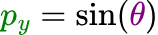
つまり、ある点 *<span style="color: rgb(230, 126, 35);">**p**</span>* の座標 ***(<span style="color: rgb(224, 62, 45);">p<sub>x</sub></span>, <span style="color: rgb(45, 194, 107);">p<sub>y</sub></span>)*** がわかるし、弧の長さ <span style="color: rgb(132, 63, 161);">***θ***</span> もわかるので関係性を作ることができる。その関係性は：

<table border="1" id="bkmrk--6" style="border-collapse: collapse; width: 100%; border-width: 1px; background-color: rgb(255, 255, 255);"><colgroup><col style="width: 99.881%;"></col></colgroup><tbody><tr><td class="align-center">![image.png](https://class.illogic.games/uploads/images/gallery/2026-06/scaled-1680-/ePMimage.png)

![image.png](https://class.illogic.games/uploads/images/gallery/2026-06/scaled-1680-/PNqimage.png)

</td></tr></tbody></table>

**サイン（sin）とコサイン（cos）は、ある角度 θ と 成分の長さ px, py の関係を表す関数（三角関数）である**

### 分かりやすい例

解けやすい成分を確認してみましょう：

#### *p<sub>x</sub>* = 1, *p<sub>y</sub>* = 0

この場合は、角度どうなる？

![image.png](https://class.illogic.games/uploads/images/gallery/2026-06/scaled-1680-/KTyimage.png)

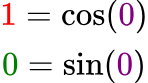
 明らかに角度は 0度 になっていることがわかる。ラジアンもゼロである。つまり、関係性は：

<table border="1" id="bkmrk--12" style="border-collapse: collapse; width: 100%; border-width: 1px; background-color: rgb(255, 255, 255);"><colgroup><col style="width: 99.881%;"></col></colgroup><tbody><tr><td>![image.png](https://class.illogic.games/uploads/images/gallery/2026-06/scaled-1680-/629image.png)

</td></tr></tbody></table>

#### *p<sub>x</sub>* = 0, *p<sub>y</sub>* = 1

この場合は、角度どうなる？

![image.png](https://class.illogic.games/uploads/images/gallery/2026-06/scaled-1680-/iWJimage.png)

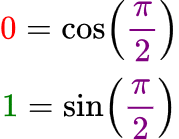
 明らかに角度は 90度 になっていることがわかる。ラジアンにすれば π/2である。つまり、関係性は：

<table border="1" id="bkmrk--14" style="border-collapse: collapse; width: 100%; border-width: 1px; background-color: rgb(255, 255, 255);"><colgroup><col style="width: 99.881%;"></col></colgroup><tbody><tr><td>![image.png](https://class.illogic.games/uploads/images/gallery/2026-06/scaled-1680-/UaVimage.png)

</td></tr></tbody></table>

#### *p<sub>x</sub>* = -1, *p<sub>y</sub>* = 0

では、ここは：

![image.png](https://class.illogic.games/uploads/images/gallery/2026-06/scaled-1680-/dEqimage.png)

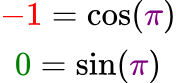
 明らかに角度は 180度 になっていることがわかる。ラジアンにすれば πである。つまり、関係性は：

<table border="1" id="bkmrk--16" style="border-collapse: collapse; width: 100%; border-width: 1px; background-color: rgb(255, 255, 255);"><colgroup><col style="width: 99.881%;"></col></colgroup><tbody><tr><td>![image.png](https://class.illogic.games/uploads/images/gallery/2026-06/scaled-1680-/4s3image.png)

</td></tr></tbody></table>

### Unityの三角関数

 Unityでは、以下の関数を準備されている：

```c#
// theta はラジアン単位である！
float px = Mathf.Cos(theta);
float py = Mathf.Sin(theta);
```

#### 逆にできないか？

今まで、角度から成分の変換してきたが、成分から角度の変換もできる。計算がやや難しいので、Unityは単純な関数がある：

```c#
// 成分から角度（ラジアン単位）へ変換
float theta = Mathf.Atan2(py, px);
```

## 単位円ではない場合

 今までの関係性はすべて「単位円」である前提で求めてきたが、ゲームを開発中には、半径が必ず「長さ１」であることを保証できない。この場合は、適切に半径の長さを掛ける（または割る）。例えば：半径は「10」であるとしたら：

```c#
float radius = 10;
float px = Mathf.Cos(theta) * radius; // 単位円 * 半径
float py = Mathf.Sin(theta) * radius; // 単位円 * 半径
float theta = Mathf.Atan2(py / radius, px / radius); // 単位円に戻し、計算
```

## 練習

Unityで三角関数を試してみましょう。スクリプトを作成し、角度と半径を変えながら、ある物体の位置（x, y）を変えてみてください。

<details id="bkmrk-%E3%82%B9%E3%82%AF%E3%83%AA%E3%83%97%E3%83%88%EF%BC%9Asincostest-%2F%2F-"><summary>スクリプト：SinCosTest</summary>

```c#
// 三角関数（Sin, Cos）の練習
public class SinCosTest : MonoBehaviour
{
    // 角度（度）
    [SerializeField]
    private float angle = 0;
    
    // 半径
    [SerializeField]
    private float radius = 1;

    private void Update()
    {
        // 度からラジアン単位へ変換
        float radian = angle * Mathf.Deg2Rad;
        
        // 角度から成分を求める
        float px = Mathf.Cos(radian);
        float py = Mathf.Sin(radian);
        
        // px と py は単位円の位置なので、半径を掛ける
        px *= radius;
        py *= radius;
        
        // 位置を設定
        transform.position = new Vector3(px, py, 0);
    }
}
```

</details>