
オンラインゲームの仕組み
How the Internet worksインターネットの仕組み
Before we start creating an online game, let's first understand how the Internet works, roughly speaking.オンラインゲームを作り始める前に、まずインターネットが大まかにどう動いているのかを理解しておこう。
Client / Server architectureクライアント/サーバー構造
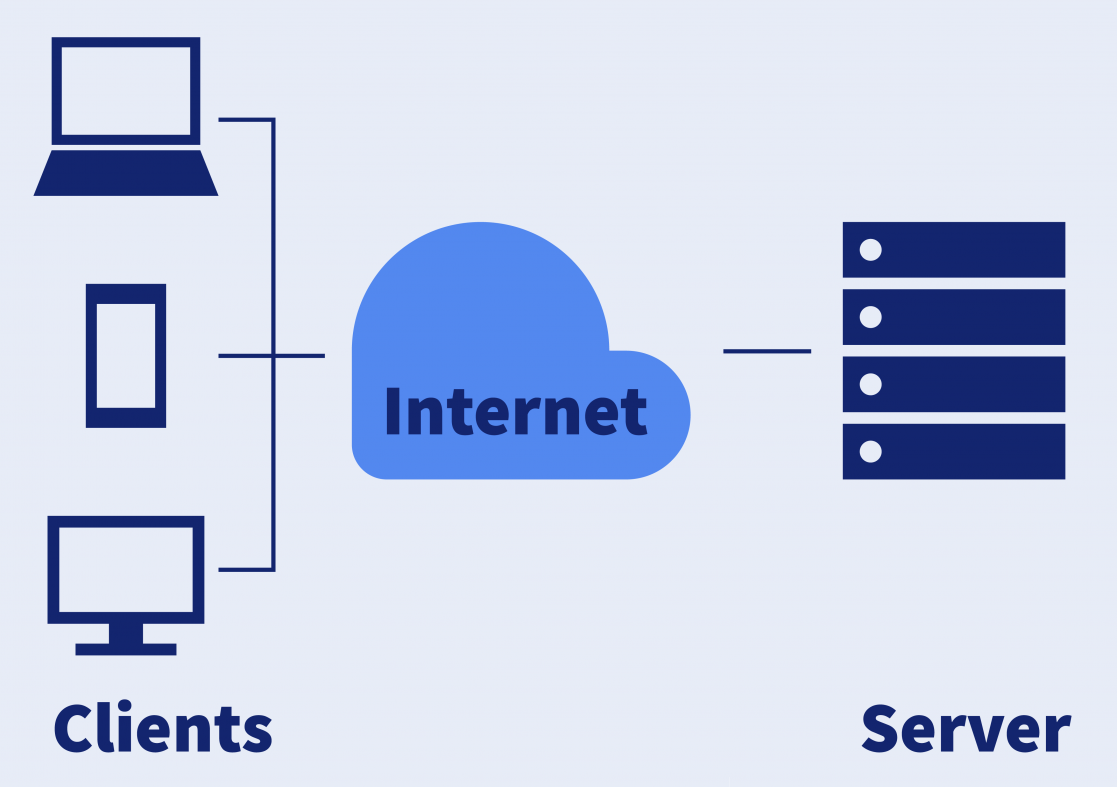
Most of the modern internet works in what is called a Client / Server architecture. In this architecture, two entities, one called Client and other one called Server send messages to each other.現代のインターネットのほとんどは「クライアント/サーバー構造」と呼ばれる仕組みで動いている。この構造では、「クライアント」と「サーバー」という2つの存在が互いにメッセージをやり取りする。
The Client is the device facing the user. This is usually the browser in your computer or your smartphone. It could be an online payment app or your favorite chat messenger. It is the application you use every day.クライアントとは、ユーザーが直接触れるデバイスのことだ。普段はパソコンやスマートフォンのブラウザがこれにあたる。オンライン決済アプリやLINEのチャットアプリもクライアントと言える。要するに、毎日使っているアプリケーションのことだ。
Theサーバーとは、データセンターなどにある遠隔地のコンピューターで、すべてのクライアントからのリクエストを受け取り、レスポンス(応答)を返す役割を持つ。例えば、QRコードで支払いをするとき、クライアントは支払い情報をサーバーに送り、サーバーがその金額を購入先の店に送金する、という流れになる。
Stateless Connectionsステートレスな接続
In most Client / Server architecture, the connection always starts with a request from the client. The Server waits patiently until a request is made. In this architecture, the Server never contacts any client, as the Server does not know who the Clients are until they connect. This type of services are usually called "Stateless", because the Server does not keep track of each Client. It simply resolves the request and closes the connection.多くのクライアント/サーバー構造では、通信は必ずクライアントからのリクエストで始まる。サーバーはリクエストが来るまでじっと待っている。この仕組みでは、サーバー側からクライアントに連絡することはない。なぜなら、クライアントが接続してくるまで、サーバーはそのクライアントが誰なのか分からないからだ。このようなサービスは「ステートレス(状態を持たない)」と呼ばれる。サーバーが個々のクライアントの状態を記憶していないからだ。サーバーはリクエストを処理し、レスポンスを返したら、それで終わり。
Think about it this way. Google serves thousands of search queries every second from all over the world. It would be impossible to keep track of which PC asked for what, so all that Google does is run the search, return the results, and then forgets about that Client.こう考えてみるといい。Googleは世界中から毎秒何千もの検索クエリを処理している。どのパソコンが何を検索したかをいちいち記録するのは不可能だ。だからGoogleは検索を実行し、結果を返したら、そのクライアントのことはもう忘れてしまう。
Requests and Responsesリクエストとレスポンス
A message sent from the client to the server is called a "Request". The answer coming back from the server is called a "Response". In Stateless Connections, once the response is sent, the connection is severed and a new connection must be made for the next request.クライアントからサーバーへ送られるメッセージを「リクエスト」と呼ぶ。サーバーから返ってくる答えを「レスポンス」と呼ぶ。ステートレスな接続では、レスポンスが送られた時点で接続は切断され、次のリクエストのためにはまた新しく接続をやり直す必要がある。
IP Addresses and portsIPアドレスとポート
IP AddressesIPアドレス
In order to connect to each other, computers need an identifier. IP addresses are unique numbers that identify each computer on the internet. Think of it as phone numbers for computers. There are two types IPv4 and IPv6. For our study, we'll mostly use IPv4 addresses, which look like this:コンピューター同士がつながるためには、識別子が必要になる。IPアドレスとは、インターネット上のすべてのコンピューターを識別するための一意の番号のことだ。コンピューターの「電話番号」のようなものだと考えるといい。IPv4とIPv6の2種類があるが、ここでは主にIPv4アドレスを扱う。IPv4は次のような形をしている。
XXX.XXX.XXX.XXX
These are 4 sets of 3 numbers between 0 and 255, separated by dots. This gives out a total of これは0〜255の数字4組をピリオドで区切ったもので、合計で
256 x 256 x 256 x 256 = 4,294,967,296
Possible addresses. However, not all of them can be used. There are some special use addresses that cannot be used on the Internet.通りのアドレスが存在する。ただし、そのすべてが使えるわけではない。インターネット上では使用できない、特別な用途のアドレスがいくつかある。
127.XXX.XXX.XXX - 127.0.0.0,0に接続しようとすると、今使っているそのコンピューターにつながることになる。
192.168.XXX.XXX - 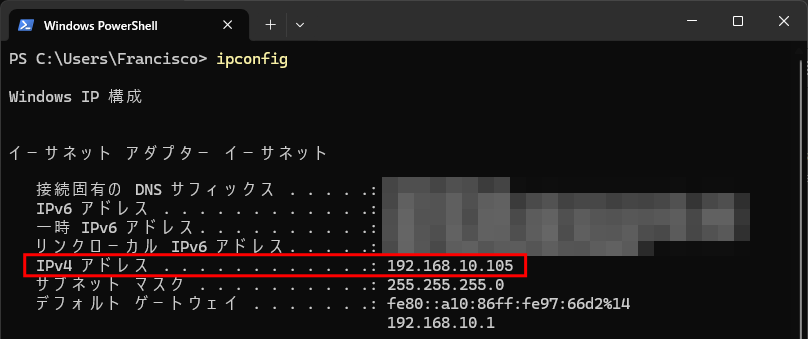
Portsポート
Portsポートとは、同じコンピューター内にある接続用の「差し込み口」のようなものだ。1台のコンピューターが持つIPアドレスは1つだけでも、同時に複数の接続を持つことができる。それぞれの接続は異なるポートを使う。ある接続ではウェブページを見ていて、別の接続ではLINEでメッセージを送っている、というようなことが同時に起きる。各ポートは1〜65535の番号で識別されるが、いくつかの番号は特定のサービス用に予約されている。
自分のパソコンが今どんな接続を使っているかは、netstat IP address, but multiple connections at the same time, each using a different port. One connection could be looking at a web page, while the other one is being used to send messages over LINE. Each port is identified with a number between 1 and 65535. However, there are some reserved numbers for specific services.コマンドですぐに確認できる。ポート番号は、接続中の各IPアドレスの後ろにあるコロン(:)の後の数字として表示される。
Port 80 - Web Services (http)Port 443 - Encrypted Web Services (https)Port 23 - E-mail services (smtp)Port 137, 138, 139, 445 - Windows file sharing services (Samba)
You can quickly check which connections your PC is using right now using the netstat command in your computer. Ports are shown by the number after the colon (:) appearing after each connected IP address.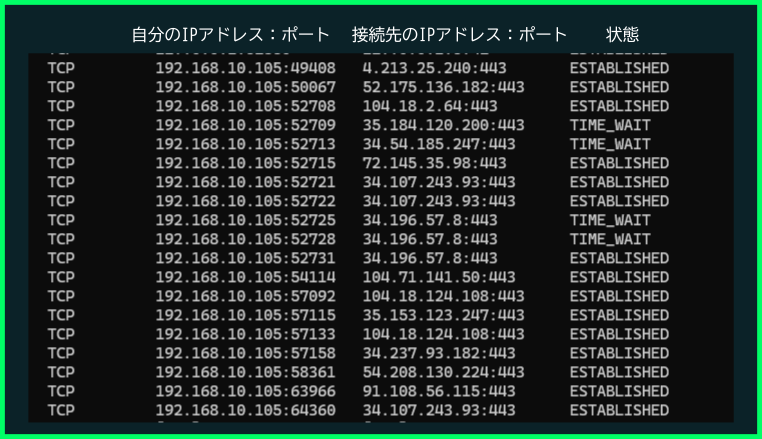
Real-timeリアルタイムゲーム vs Asynchronous games非同期ゲーム
Depending on the play style of the game, we can break how they connect to the server in two different waysゲームのプレイスタイルによって、サーバーへの接続方法は大きく2つに分けられる。
Real-time gamesリアルタイムゲーム
Games in this category are First Person Shooters and MMOs. They need a quick, fast connection to the server. The server needs to respond fast too as delays in the response can drastically change the outcome of the game. Because of this, the game usually use permanent connections to the server and small data packets in binary format so they can be sent and processed quickly.このカテゴリーに入るのは、FPS(ファーストパーソン・シューティングゲーム)やMMOなどだ。サーバーへの速く安定した接続が必要になる。サーバー側のレスポンスも速くなければならない。レスポンスが遅れると、ゲームの結果が大きく変わってしまうこともあるからだ。そのため、こうしたゲームは通常サーバーへの常時接続を使い、素早く送受信・処理できるようバイナリ形式の小さなデータパケットを使う。
Asynchronous games非同期ゲーム
Asynchronous games are games in which lag is not an issue. A request can be sent to a server and a delay of 1 or 2 seconds would not cause any issues to the game play. Games in this category include trading card games or item collection games. Since speed is not a necessity, stateless connections are preferred, only sending data when necessary. Data is usually sent in JSON text format since it's easier to manage and read.非同期ゲームとは、多少の遅延(ラグ)が問題にならないゲームのことだ。リクエストを送ってから1〜2秒の遅れがあっても、ゲームプレイに支障は出ない。トレーディングカードゲームやアイテム収集ゲームなどがこのカテゴリーに入る。速度が重要でないため、必要なときだけデータを送るステートレスな接続の方が好まれる。データは扱いやすく読みやすいJSONのテキスト形式で送られることが多い。
What is an API?APIとは何か
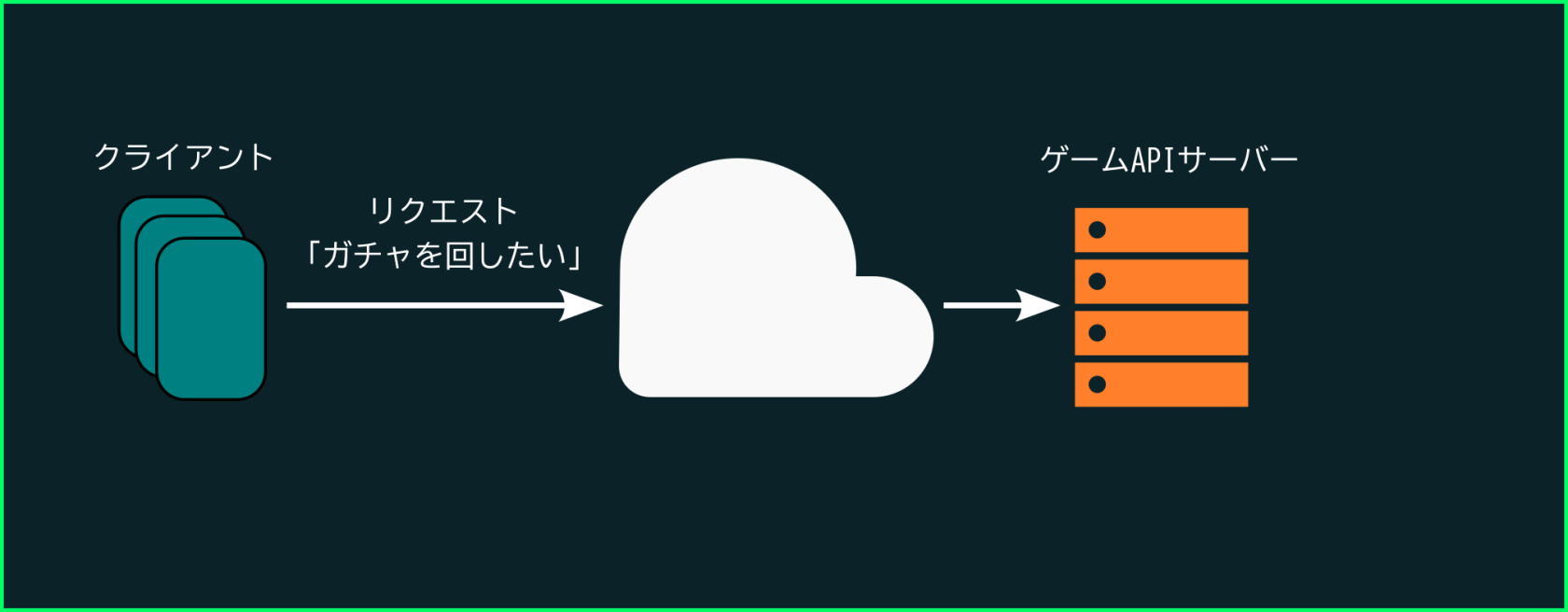
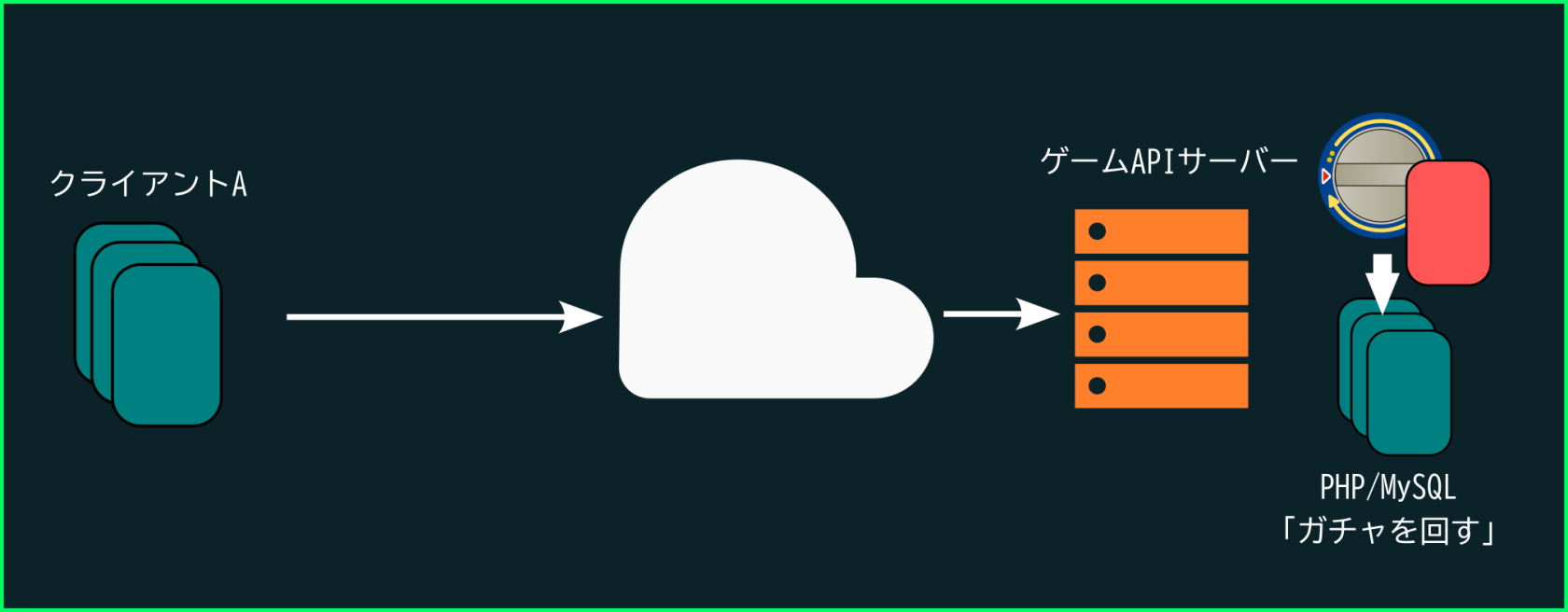
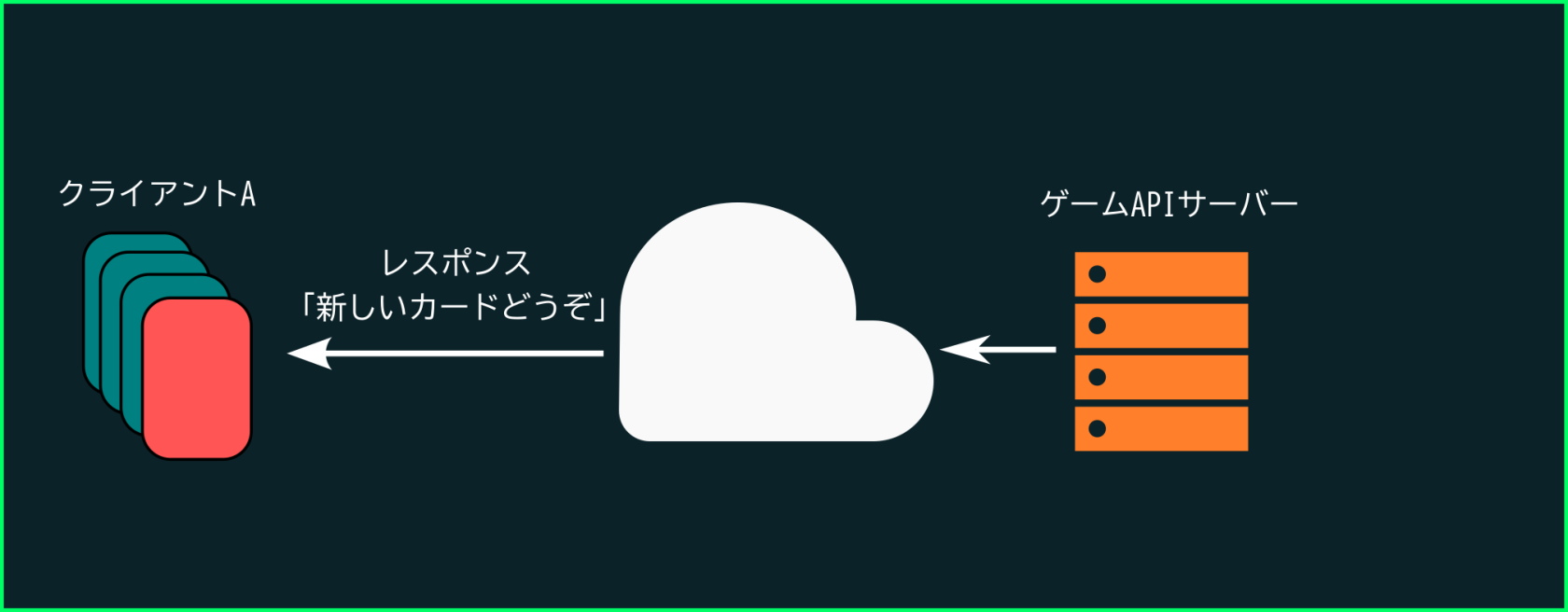
API stands for Application Programming Interface. In simple terms, it is a function or method that exists in the internet. Online games and other applications can use APIs to run part of their code online. For example, on a trading card game, we want to pull a gacha to get a new card. We can only pull a gacha once a day, so we need to confirm with the server. We use an API to send a "request" to the server to perform a gacha pull and, if the conditions are met, the server runs the necessary code to make it happen, giving the client the result of the operation as a "response".APIとは「アプリケーション・プログラミング・インターフェース」の略だ。簡単に言うと、インターネット上に存在する関数やメソッドのことだ。オンラインゲームなどのアプリケーションは、コードの一部をオンラインで実行するためにAPIを使う。例えば、トレーディングカードゲームで新しいカードを手に入れるためにガチャを引きたいとする。ガチャは1日に1回しか回せないので、サーバー側で確認する必要がある。そこでAPIを使ってサーバーに「ガチャを回す」というリクエストを送り、条件を満たしていればサーバーが必要な処理を実行し、その結果をレスポンスとしてクライアントに返す。
The goal of this subjectこの科目のゴール
In this subject we will learn how to create an online game API using PHP and a database (この科目では、PHPとデータベース(MySQL). We will learn how to store and search data on the server, so we can organize users and the items they have. Then we will use PHP to create an API (functions on the cloud) that we can run to login into the server and check our inventoryを使ってオンラインゲームのAPIを作る方法を学ぶ。サーバー上でデータを保存・検索する方法を学び、ユーザーとその所持アイテムを管理できるようにする。そして、PHPを使ってAPI(クラウド上の関数)を作り、サーバーにログインして自分のインベントリを確認できるようにする。
Finally,最後に、Unityを使ってそのAPIにアクセスし、自分たちで作ったサーバーに接続してゲームをプレイし、結果をテストしていく。