
GETとPOSTのデータ送信
Sending data from the client to the server
So far, we've seen how we can put content on the server and retrieve it using a web browser. However, there are situations in which we need to send data from the web browser to the server.
GETThink about a login page. You input your user name and password, and that data has to be sent to the server. The server checks its database and if the user and password match, it tells the browser to recognize the login.
In web development, there are two ways to send data from the client to the server. GET and POST
GET
GET is used for short strings and values. To pass GET values from the client to the server, you write them at the end of the URL like so:
http://www.mywebsite.co.jp/mypage.php?変数A=値A;変数B=値B ...
At the end of the URL add a "?" to indicate that the following are GET values. Then pass each pair of values separated by a semicolon ";"
For example, let's say I want to search google for 大原学園. I could go to google and write my query or, I can just simply:
https://www.google.com/search?q=大原学園
here, I'm passing google one value "q" for "query" (検索) as "大原学園"。
In PHP we can obtain GET parameters through a special global associative array named $_GET. Let's try the following exercise
<?php
	// get_example.phpで保存してください

	// "name"のパラメータが設定されている?
	if (!isset($_GET["name"]))
	{
		print("お名前を教えてください");
	}

	else
	{
		$name = $_GET["name"];
		print("こんにちは、" . $name . "さん。");
	}
?>
Here isset() checks if the GET variable exists. Now, open a browser and try:
http://localhost/get_example.php?name=一郎

As you can see, the variable "name" has been read and displayed correctly. Let's add a second parameter "age" (年齢) to the URL
<?php
	// get_example.phpで保存してください

	// "name"のパラメータが設定されている?年齢も?
	if (!isset($_GET["name"]) || !isset($_GET["age"]))
	{
		print("お名前と年齢を教えてください");
	}

	else
	{
		$name = $_GET["name"];
		print("こんにちは、" . $name . "さん。");

		$beerOk = $_GET["age"] >= 20;
		if ($beerOk)
			print("ビールはいかがでしょうか?");
		else
			print("コーラを飲みませんか?");
	}
?>
And try with
http://localhost/get_example.php?name=一郎&age=19

Just for fun, try again without passing any parameters:
http://localhost/get_example.php
And see what happens.
POST
POST is another way to send data to the browser. It is often used for non-string information, like images and text files (for example, when you attach an image to your Instagram post, it is sent using POST). POST is also used to send small parameters, but hidden from the URL so the user cannot directly edit them.
Since POST data is hidden from the URL, we need a special way to send the data to the server. We need to create an "HTML Form" that the browser can use to POST the data to the server. First, let's create a simple HTML form with the same two parameters as in our previous example:
<!-- post_form.html として保存してください -->
<meta charset="utf-8">
<form action="get_example.php" method="get">
	<input type="text" name="name" value="一郎">
	<input type="text" name="age" value="19">
	<input type="submit">
</form>
This is a very simple example of a form. Let's study it:
<meta charset="utf-8"><form action="get_example.php" method="get"><input type="text" name="name" value="一郎">
<input type="text" name="age" value="19">Send two text variables to get_example.php ("name", and "age")
The default values are 一郎 and 19
<input type="submit">Display the Send / Submit button. Pressing this button will send the values to get_example.php
</form>End of the form
Open a browser to http://localhost/post_form.html and press the Submit button
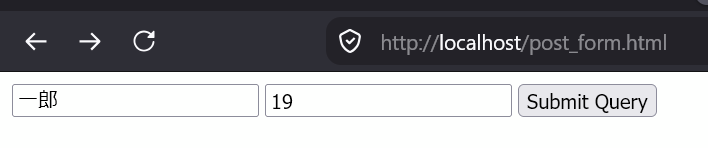
As you can see, all this does is pass the same parameters through the URL (GET Method). Let's switch it to POST. First, on the form, replace:
<form action="get_example.php" method="get">with
<form action="post_example.php" method="post">Now we need to edit our PHP script and instead of reading from $_GET, we need to read from $_POST. Copy get_example.php and rename it to post_example.php so it looks like this:
<?php
	// post_example.phpで保存してください

	// "name"のパラメータが設定されている?年齢も?
	if (!isset($_POST["name"]) || !isset($_POST["age"]))
	{
		print("お名前と年齢を教えてください");
	}

	else
	{
		$name = $_POST["name"];
		print("こんにちは、" . $name . "さん。");

		$beerOk = $_POST["age"] >= 20;
		if ($beerOk)
			print("ビールはいかがでしょうか?");
		else
			print("コーラを飲みませんか?");
	}
?>
Then reload the form and try again. As you can see, the URL is not showing any parameters:

Not only browsers! (show
So curl)far we have been testing sending data to the server using a browser. And while this is a very common use, it is not the only one. Any application can send data to a webserver using GET and POST. We will learn later in Unity how to send data from our Unity game to the PHP server using the UnityWebRequest class.