
GETとPOSTのデータ送信
Sending data from the client to the serverクライアントからサーバーへのデータ送信
So far, we've seen how we can put content on the server and retrieve it using a web browser. However, there are situations in which we need to send data from the web browser to the server.ここまでは、サーバー上にコンテンツを置いて、それをウェブブラウザで取得する方法を見てきた。しかし、逆にウェブブラウザからサーバーへデータを送る必要がある場合もある。
Think about a login page. You input your user name and password, and that data has to be sent to the server. The server checks its database and if the user and password match, it tells the browser to recognize the login.ログインページを考えてみよう。ユーザー名とパスワードを入力すると、そのデータをサーバーに送信しなければならない。サーバーはデータベースを確認して、ユーザー名とパスワードが一致すればブラウザにログインを認識させる。
In web development, there are two ways to send data from the client to the server. GET and POSTウェブ開発では、クライアントからサーバーへデータを送る方法が2つある。GETとPOSTだ
GET
GET is used for short strings and values. To pass GET values from the client to the server, you write them at the end of the URL like so:GETは短い文字列や値を送るときに使う。GETの値をクライアントからサーバーへ渡すには、以下のようにURLの末尾に書く。
http://www.mywebsite.co.jp/mypage.php?変数A=値A;変数B=値B ...
At the end of the URL add a "URLの末尾に「?" to indicate that the following are GET values. Then pass each pair of values separated by a semicolon "」を付けて、その後がGETの値であることを示す。そして、各値のペアを「;"」(セミコロン)で区切って渡す。
For example, let's say I want to search google for 大原学園. I could go to google and write my query or, I can just simply:例えば、Googleで「大原学園」を検索したいとする。Googleにアクセスして検索語を入力してもいいが、単純に次のようにすることもできる
https://www.google.com/search?q=大原学園
here, I'm passing google one value "q" for "query" ここでは、「q」(検索) as "大原学園"。query、つまり検索)という1つの値として「大原学園」をGoogleに渡している。
In PHP we can obtain GET parameters through a special global associative array named PHPでは、$_GET. Let's try the following exercise_GETという特別なグローバル連想配列を通してGETパラメータを取得できる。以下の演習をやってみよう。
<?php
	// get_example.phpで保存してください

	// "name"のパラメータが設定されている?
	if (!isset($_GET["name"]))
	{
		print("お名前を教えてください");
	}

	else
	{
		$name = $_GET["name"];
		print("こんにちは、" . $name . "さん。");
	}
?>
Here isset(ここでisset() checks if the GET variable exists. Now, open a browser and try:は、そのGET変数が存在するかどうかをチェックしている。では、ブラウザを開いて次を試してみてください。
http://localhost/get_example.php?name=一郎

As you can see, the variable "name" has been read and displayed correctly. Let's add a second parameter "age" (年齢) to the URL見ての通り、変数「name」が正しく読み込まれて表示されている。今度はURLに2つ目のパラメータ「age」(年齢)を追加してみよう。
<?php
	// get_example.phpで保存してください

	// "name"のパラメータが設定されている?年齢も?
	if (!isset($_GET["name"]) || !isset($_GET["age"]))
	{
		print("お名前と年齢を教えてください");
	}

	else
	{
		$name = $_GET["name"];
		print("こんにちは、" . $name . "さん。");

		$beerOk = $_GET["age"] >= 20;
		if ($beerOk)
			print("ビールはいかがでしょうか?");
		else
			print("コーラを飲みませんか?");
	}
?>
And try withそして次を試してみてください。
http://localhost/get_example.php?name=一郎&age=19

Just for fun, try again without passing any parameters:ちょっとした遊びとして、今度はパラメータを何も渡さずに試してみよう。
http://localhost/get_example.php
And see what happens.どうなるか見てみてください。
POST
POST is another way to send data to the browser. It is often used for non-string information, like images and text files (for example, when you attach an image to your Instagram post, it is sent using POST). POST is also used to send small parameters, but hidden from the URL so the user cannot directly edit them.POSTもブラウザにデータを送るもう一つの方法だ。画像やテキストファイルのような、文字列ではない情報を送るときによく使われる(例えば、Instagramの投稿に画像を添付するとき、それはPOSTで送信されている)。POSTは小さなパラメータを送るのにも使われるが、URLには表示されないので、ユーザーが直接それを編集できないという特徴がある。
Since POST data is hidden from the URL, we need a special way to send the data to the server. We need to create an "HTML Form" that the browser can use to POST the data to the server. First, let's create a simple HTML form with the same two parameters as in our previous example:POSTのデータはURLに表示されないため、サーバーへデータを送るには特別な方法が必要になる。ブラウザがPOSTでサーバーへデータを送れるように「HTMLフォーム」を作る必要がある。まずは、先ほどの例と同じ2つのパラメータを持つ、シンプルなHTMLフォームを作ってみよう。
<!-- post_form.html として保存してください -->
<meta charset="utf-8">
<form action="get_example.php" method="get">
	<input type="text" name="name" value="一郎">
	<input type="text" name="age" value="19">
	<input type="submit">
</form>
This is a very simple example of a form. Let's study it:これはフォームのごくシンプルな例だ。1行ずつ見ていこう。
<meta charset="utf-8"><form action="get_example.php" method="get">get_example.php <input type="text" name="name" value="一郎">
<input type="text" name="age" value="19">Send two text variables to get_example.phpへ2つのテキスト変数(「name」と「age」)を送る。 ("name", and "age")
The default values are 一郎 and 19デフォルト値は「一郎」と「19」
<input type="submit">Display送信ボタンを表示する。このボタンを押すと値が the Send / Submit button. Pressing this button will send the values to get_example.php に送られる
</form>End of the formフォームの終了
Openブラウザで a browser to http://localhost/post_form.html and press the Submit buttonを開いて、送信ボタンを押してみてください。
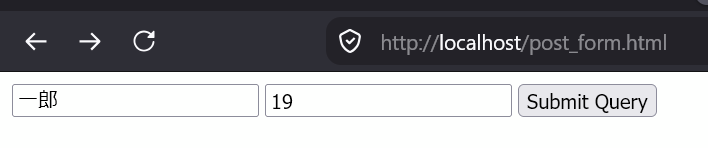
As you can see, all this does is pass the same parameters through the URL (GET Method). Let's switch it to POST. First, on the form, replace:見ての通り、これは同じパラメータをURL経由(GETモード)で渡しているだけだ。今度はこれをPOSTに切り替えてみよう。まず、フォームの中の
<form action="get_example.php" method="get">withを
<form action="post_example.php" method="post">Nowに置き換えてください。
次にPHPスクリプトを編集して、$_GET needの代わりに to$_POST edit our PHP script and instead of reading from $_GET, we need to read from $_POST. Copy から読み込むようにする必要がある。get_example.php andをコピーして rename it to post_example.php so it looks like this:という名前に変更し、次のようにしよう。
<?php
	// post_example.phpで保存してください

	// "name"のパラメータが設定されている?年齢も?
	if (!isset($_POST["name"]) || !isset($_POST["age"]))
	{
		print("お名前と年齢を教えてください");
	}

	else
	{
		$name = $_POST["name"];
		print("こんにちは、" . $name . "さん。");

		$beerOk = $_POST["age"] >= 20;
		if ($beerOk)
			print("ビールはいかがでしょうか?");
		else
			print("コーラを飲みませんか?");
	}
?>
Then reload the form and try again. As you can see, the URL is not showing any parameters:そしたらフォームを再読み込みして、もう一度試してみてください。見ての通り、今度はURLにパラメータが表示されていない。

Not only browsers! ブラウザだけじゃない!
Soここまではブラウザを使ってサーバーへデータを送るテストをしてきた。これはとてもよくある使い方だけど、それだけではない。どんなアプリケーションでも、GETとPOSTを使ってウェブサーバーにデータを送ることができる。Unityの授業では、UnityWebRequest far we have been testing sending data to the server using a browser. And while this is a very common use, it is not the only one. Any application can send data to a webserver using GET and POST. We will learn later in Unity how to send data from our Unity game to the PHP server using the UnityWebRequest class.クラスを使って自分のUnityゲームからPHPサーバーへデータを送る方法を後で学ぶ。