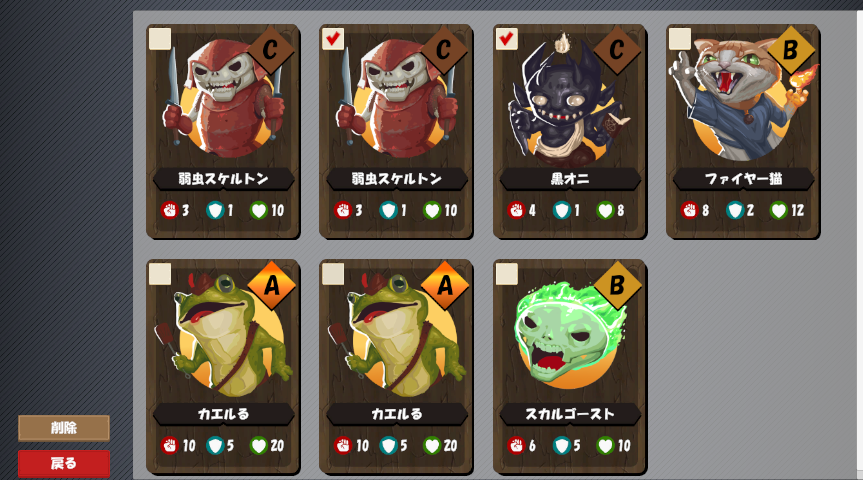
カード削除
To delete cards, we need to create a new API in PHP that
- Receives the user id
- Receives a list of card ids to remove (including duplicates)
- Runs an SQL query that reduces the count by 1 for each card that matches the request
- If the count reaches zero, remove the record from the database
Removing cards using SQL
First, let's see how decreasing the count in SQL would look like. Let's say we want to decrease user_id = 1, card_id = 1 by two cards. Since this user has 2 cards of card_id = 1, this would remove all cards. We can decrease the count by telling MySQL to subtract 2 from the field "count" like so:
UPDATE user_cards SET count = count - 2 WHERE user_id = 1 and card_id = 1;This is telling MySQL to take the column "count" and subtract it by 2, but only for user_id = 1and card_id = 1. After running it we get:

We can check that the count went to zero. All we have to do next is remove all records where count is 0 or less. We can easily do that with DELETE.
DELETE FROM user_cards WHERE count <= 0;We can use these two instructions in PHP to remove cards from players. Let's design our API
PHP スクリプト
Before we get started, let's restore our database. Run the following SQL command in phpMyAdmin:
REPLACE INTO `user_cards` (`id`, `user_id`, `card_id`, `count`) VALUES
(1, 1, 1, 2), (2, 1, 2, 1), (3, 1, 5, 1),(4, 1, 8, 2),
(5, 1, 6, 1), (6, 2, 3, 5), (7, 2, 6, 3),(8, 2, 12, 1);
Now, let's design our script. Create a new file called delete_player_cards.php. In our API, we are going to request the client to send us the user id and how many cards to delete for each card id. Since the amount of cards to be deleted is variable, we are going to request the client to send the cards to be deleted as a JSON object that looks like this:
{
	"user_id" : "1",
	"cards" : [
		{
			"id" : "1",
			"count" : 2
		},
		{
			"id" : "8",
			"count" : 1
		},
	]
}
In this example, we want to remove 2 copies of card id "1", and 1 copy of card id "8" for user id "1". Since we don't have any way to send data yet, let's code it directly into the script first. We'll use POST later to send the data from Unity.
<?php
	// JSONを返すべき
	header("Content-Type: application/json; charset=utf-8");

	// 接続
	$dbh = new PDO('mysql:host=localhost; dbname=card_game', "root", "", [PDO::ATTR_PERSISTENT => true]);

	// テスト中にデータを固定
	$data = '{
		"user_id" : "1",
		"cards" : [
			{ "id" : "1", "count" : 2 },
			{ "id" : "8", "count" : 1 }
		]
	}';

	// JSONに変換
	$json = json_decode($data, true);

	// ユーザーIDと削除したいデータの分ける
	$user_id   = $json['user_id'];
	$card_list = $json['cards'];
?>
Now we can build our SQL statement using a for loop to iterate over each card delete request in the array.
// SQL文を構築
foreach ($card_list as $card)
{
    $sql = "UPDATE user_cards SET count = count - " . $card['count']
         . " WHERE user_id = " . $user_id
         . " AND card_id = " . $card['id'];

    // 確認しましょう
    print($sql . "\n");
}
If we run it, we should see something like this:
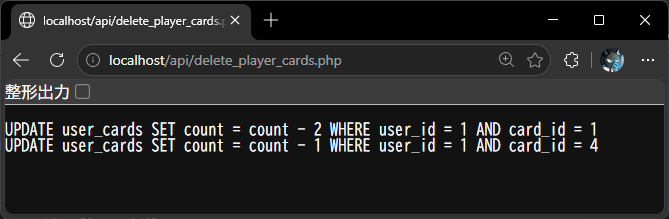
This is exactly what we need to delete cards! Let's complete our script by executing the SQL statement and delete cards from the database.
// SQL文を構築
foreach ($card_list as $card)
{
    $sql = "UPDATE user_cards SET count = count - " . $card['count']
         . " WHERE user_id = " . $user_id
         . " AND card_id = " . $card['id'];

    $dbh->exec($sql);
}

// 最後に、countが0以下になったカードを削除
$dbh->exec("DELETE FROM user_cards WHERE count <= 0");

// 空のJSONを返す
print("{}")
and we can check before running our code:
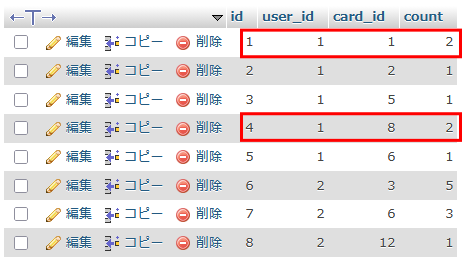
and after:
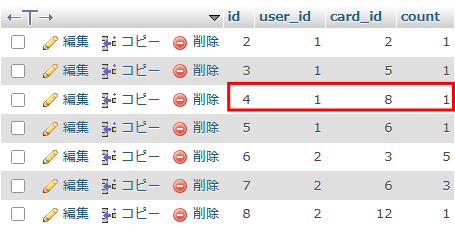
All that is left now is to replace our test JSON with the actual POST input. This is our final script:
<?php
	// JSONを返すべき
	header("Content-Type: application/json; charset=utf-8");

	// 接続
	$dbh = new PDO('mysql:host=localhost; dbname=card_game', "root", "", [PDO::ATTR_PERSISTENT => true]);

	// POSTデータを取得
	$data = $_POST['data'];

	// JSONに変換
	$json = json_decode($data, true);

	// ユーザーIDと削除したいデータの分ける
	$user_id   = $json['user_id'];
	$card_list = $json['cards'];

	// SQL文を構築
	foreach ($card_list as $card)
	{
		$sql = "UPDATE user_cards SET count = count - " . $card['count']
  		     . " WHERE user_id = " . $user_id
			 . " AND card_id = " . $card['id'];

		$dbh->exec($sql);
	}

	// 最後に、countが0以下になったカードを削除
	$dbh->exec("DELETE FROM user_cards WHERE count <= 0");

	// 空のJSONを返す
	print("{}")
?>
Unityを使い、APIとの接続
Our next step is to implement the Unity side. We need to create the same data structure our PHP script is expecting. The APIRequest will require the user id, and the list of card ids to delete:
// プレーヤーのカードを削除する
// userID:ユーザーID
// cards: 削除したい「カードID」→「数」のディクショナリー
public static async Awaitable DeleteCardsAsync(string userID, Dictionary<string, int> cards)
{
    // JSONを構築
    JArray list = new JArray();
    foreach (var (id, count) in cards)
    {
        JObject card  = new JObject();
        card["id"]    = id;
        card["count"] = count;
        list.Add(card);
    }

    JObject json    = new JObject();
    json["user_id"] = userID;
    json["cards"]   = list;

    // POSTでデータを準備
    var postData = new WWWForm();
    postData.AddField("data", json.ToString());

    // APIのURLへリクエストを送信
    const string url = ServerAPI + "/delete_player_cards.php";
    var webRequest = UnityWebRequest.Post(url, postData);

    // 返事を待機し、終わり(何も返さない)
    await webRequest.SendWebRequest();
}
Our final step is to modify the game UI so when the delete button is pressed, we collect the card information we need. Since the the request may take a few moments, we need to write an asynchronous method:
// 選択されたカードを削除
private void DeleteSelectedCards()
{
    _ = DeleteCardsAsync();
}

// 選択されたカードを削除(非同期)
private async Awaitable DeleteCardsAsync()
{
    // 削除ボタンを無効にする
    deleteButton.interactable = false;

    // 表示中のカードを巡り、選択されたものを処理
    var cards = new Dictionary<string, int>();
    foreach (Transform child in cardsList.transform)
    {
        // 選択されていない?
        var card = child.GetComponent<CardDisplay>();
        if (!card.IsSelected)
            continue;

        // 同じIDだったら、数える
        cards.TryAdd(card.CardID, 0);
        cards[card.CardID]++;
    }

    // カードがなければ、終わり
    if (cards.Count == 0) return;

    // サーバーに依頼し…
    await APIRequest.DeleteCardsAsync(LoginController.UserID, cards);

    // …再読み込み依頼
    await LoadCardsAsync();

    // 削除ボタンを有効にする
    deleteButton.interactable = true;
}
All that's left is to select a few cards, and check if the database is updated: