
ガチャを引く
We listed cards and deleted them, now let's add some cards by playing a gacha game. The game must implement the following features
- The player can pull a gacha a limited amount of times
- Card rarity is linked to card rank (SS cards are more rare than C cards)
In particular, here's the probability for each card rarity:
| Rank | SS | S | A | B | C |
| Rarity (%) | 5% | 10% | 20% | 30% | 35% |
Database
Let's start by making a new table in the database to store how many gacha pulls each player has. We need the user id and the number of pulls.

Notice that we don't need an auto-increment id for this table. The reason why is because each user has only 1 entry in the gacha table, so we can reuse the user_id as the primary key for this table. Let's give user_id = 1 a total of 3 gacha pulls to begin with:
INSERT INTO `gacha` (`user_id`, `count`) VALUES ('1', '3');
PHP Script
Number of gacha pulls
We need two new APIs. One to check the number of gacha pulls and another one that actually executes the pull. The first one is the simplest, so let's start with a new script called get_gacha_count.php. This is a simple SELECT query that checks how many counts the player has. If there is no entry in the table, we return 0.
As always, we can first test with GET parameters. Let's pass the user_id we want to query as an argument.
<?php
	// JSONを返すべき
	header("Content-Type: application/json; charset=utf-8");

	// 接続
	$dbh = new PDO('mysql:host=localhost; dbname=card_game', "root", "", [PDO::ATTR_PERSISTENT => true]);

	// ユーザーIDを取得
	$userID = $_GET'user_id'];

	// SQL文を構築
	$sql = "SELECT * FROM gacha WHERE user_id = " . $userID;

	// デフォルトとして 0 を返す
	$json['count'] = 0;

	// 見つけたら、回数を取得
	$result = $dbh->query($sql);
	if ($result->rowCount() == 1)
	{
		$record = $result->fetch();
		$json['count'] = $record['count'];
	}

	// 返す
	print(json_encode($json));
?>
If we test with user 1 and user 3, we get:
|
|
|
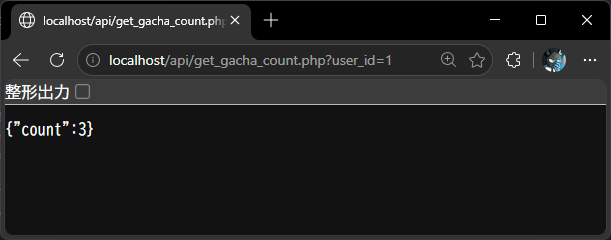

Which is the correct output we need. Don't forget to switch the $_GET to $_POST before we move onto the next step!
Gacha pull
The next scrips executes the gacha pull. This is a bit more complex, as it needs to do a few things
- Randomly generate a card rank from SS to C
- Query the database for all cards of the selected rank
- Select 1 card randomly
- Add the card to the player's list of cards
- Decrease the number of gacha pulls by 1
- Return to the game (Unity) a JSON with the newly obtained card
We can break this into 4 different functions and call them one at the time. Let's start with random card generation. Create a new script called gacha_pull.php
Random card rank with probability
// 確率によりランダムランクを作成
// 0:C ~ 4:SS
function createRandomRank()
{
	// 0~100までの乱数を生成
	$chance = rand(0, 100)

	// 5% 以下だったら、SSランク(4)のカードになる
	if ($chance < 5)
		return 4;

	// 15% 以下だったら、Sランク(3)のカードになる
	if ($chance < 15)
		return 3;

	// 35% 以下だったら、Aランク(2)のカードになる
	if ($chance < 35)
		return 2;

	// 65% 以下だったら、Bランク(1)のカードになる
	if ($chance < 65)
		return 1;

	// 残りは C(0)
	return 0;
}
This script generates a random number between 0 and 100 and then checks each cumulative probability until it finds a rank to return between 0 (C) and 4 (SS)
Select random card from database with rank
The next script takes a rank value from 0 to 4, queries the database and returns 1 random card record.
// ランクを用いて、ランダムのカードを返す
// $dbh:  データベースを検索するためのPDO
// $rank: カードのランク
function getCardWithRank($dbh, $rank)
{
    // SQL文を構築
    $sql = "SELECT * FROM cards WHERE rank = " . $rank;

    // すべてのレコードを取得
    $result = $dbh->query($sql);
    $records = $result->fetchAll();

    // ランダムのを選択
    $count = sizeof($records);
    $idx   = rand(0, $count-1);
    return $records[$idx];
}
Add the card to the player
In this step, we modify user_cards table to update the cards the player has. If the player already had the card, we need to add 1 to the count. However, if the player never owned the card, we need to add a new record with a starting count of 1. Fortunately, SQL has a special statement for that called INSERT ... ON DUPLICATE. It's a bit complex to read, but it looks something like this:
INSERT INTO table (カラム1, カラム2, ...) VALUES (値1, 値2, ..)
ON DUPLICATE KEY UPDATE カラム1 = 値1, カラム2 = 値2, ...
In this case, if a duplicate match is found, it will update instead of inserting a new record in the table. For that, however, we need to mark the non-duplicate fields as "UNIQUE". Before we can continue, let's open phpMyAdmin and edit the user_cards table:
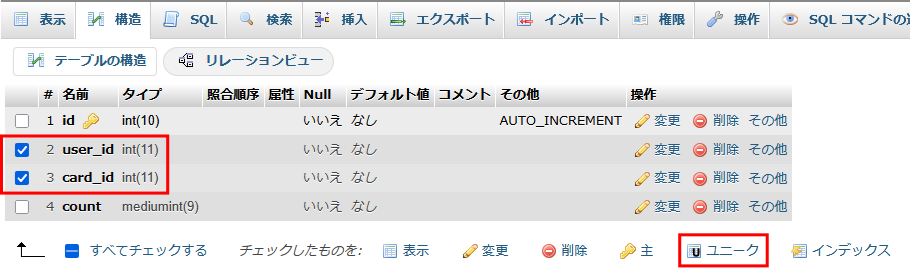
Select both user_id and card_id and then mark them as "UNIQUE". This tells the database that there cannot be any records in which the user_id-card_id pair are repeated. So for example
user_id = 3, card_id = 1
can coexist with
user_id = 3, card_id = 2
and
user_id = 2, card_id = 1
since at least one field is different. Trying to add another record with user_id = 3, card_id = 1 will result in an error and won't be added to the database, since that combination must be unique. We can confirm that set of these two columns must be unique:
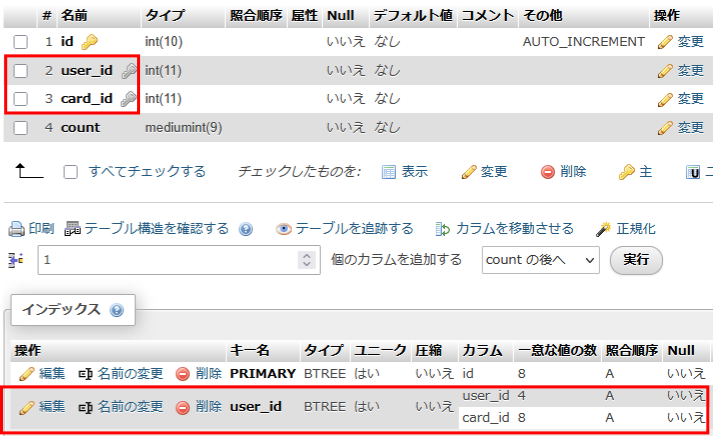
Since we have now a unique field, we can use the special INSERT ... ON DUPLICATE statement to either add or update depending whether the user / card pair exists or not like so (roughly):
INSERT INTO user_cards (user_id, card_id, count) VALUES ($userID, $cardID, 1)
ON DUPLICATE KEY UPDATE count = count + 1
This statement will try to add a new user_id / card_id pair with a starting count of 1. But if it is a duplicate, it will increase count by 1. Now we can write our PHP function like so:
// ユーザーにカードを追加する
// $dbh:    データベースを検索するためのPDO
// $userID: ユーザーID
// $cardID: カードID
function addCardToPlayer($dbh, $userID, $cardID)
{
    // SQL文を構築
    $sql = "INSERT INTO user_cards (user_id, card_id, count) "
         . "VALUES ($userID, $cardID, 1) "
         . "ON DUPLICATE KEY UPDATE count = count + 1";

    // 実行
    $result = $dbh->exec($sql);
}
Decreasing gacha count
Now that we added the card to the player, we can decrease the amount of gacha pulls available. This is a simple UPDATE statement:
// ガチャの数を減らす
// $dbh:    データベースを検索するためのPDO
// $userID: ユーザーID
function decreaseGachaPullCount($dbh, $userID)
{
    // SQL文を構築
    $sql = "UPDATE gacha SET count = count - 1 "
         . "WHERE user_id = " . $userID;

    // 実行
    $result = $dbh->exec($sql);
}
Putting it all together
Now all we need to do is run all the functions and return the card to the player through JSON.
// JSONを返すべき
header("Content-Type: application/json; charset=utf-8");

// 接続
$dbh = new PDO('mysql:host=localhost; dbname=card_game', "root", "", [PDO::ATTR_PERSISTENT => true]);

// ユーザーID
$userID = $_POST['user_id'];

$rank = createRandomRank();
$card = getCardWithRank($dbh, $rank);
addCardToPlayer($dbh, $userID, $card['id']);
decreaseGachaPullCount($dbh, $userID);

// カード情報を返す
$json['card']['id']           = $card['id'];
$json['card']['rank']         = $card['rank'];
$json['card']['picture_id']   = $card['picture_id'];
$json['card']['monster_name'] = $card['monster_name'];
$json['card']['atk_value']    = $card['attack'];
$json['card']['def_value']    = $card['defense'];
$json['card']['hp_value']     = $card['hit_points'];

print(json_encode($json));
The entire script is here.
Unityを使い、APIとの接続
Now we work on the Unity side. Let's create two API requests first, one for each PHP function:
APIRequest
Gacha count:
// ガチャの回数を返す
// userID:ユーザーID
public static async Awaitable<int> GetGachaCountAsync(string userID)
{
    // POSTでデータを準備
    var postData = new WWWForm();
    postData.AddField("user_id", userID);

    // APIのURLへリクエストを送信
    const string url = ServerAPI + "/get_gacha_count.php";
    var webRequest = UnityWebRequest.Post(url, postData);

    // 返事を待機する
    await webRequest.SendWebRequest();

    // 返事の文字列を取得
    var webResponse = webRequest.downloadHandler.text;

    // JSONからPlayerCardの配列へ変換
    JObject response = JObject.Parse(webResponse);

    // 返す
    return (int)response["count"];
}
Gacha pull:
// ガチャを引く
// userID:ユーザーID
public static async Awaitable<JObject> GachaPullAsync(string userID)
{
    // POSTでデータを準備
    var postData = new WWWForm();
    postData.AddField("user_id", userID);

    // APIのURLへリクエストを送信
    const string url = ServerAPI + "/gacha_pull.php";
    var webRequest = UnityWebRequest.Post(url, postData);

    // 返事を待機する
    await webRequest.SendWebRequest();

    // 返事の文字列を取得
    var webResponse = webRequest.downloadHandler.text;

    // JSONからPlayerCardの配列へ変換
    JObject response = JObject.Parse(webResponse);

    // 返す
    return (JObject)response["card"];
}
GachaController
Gacha count
Next we need to update GachaController.cs. This script right now is just playing the animation, but it is not connected to the server. Let's update it so it uses the API to check for the number of pulls available and execute as many times as we are allowed to do it.
In UpdateGachaCountAsync() replace these lines
// 未実装:サーバーに依頼し、数を取得
await Awaitable.NextFrameAsync();
int count = 1; // とりあえず固定
with the API call:
// サーバーに依頼し、数を取得
int count = await APIRequest.GetGachaCountAsync(LoginController.UserID);
Try it on Unity and see we correctly receive "3" pulls as we set it in the database.
Gacha pull
Finally, we need to connect the pull API with GachaController, and update the card display to show the result. Since the API returns the card information in the same format that CardDisplay expects it, we can tie it up fairly simply:
In PullGachaAsync() replace these lines:
// 未実装:サーバーに依頼し、ガチャを引き、
//        カードを更新する
await Awaitable.NextFrameAsync();
With these:
//サーバーに依頼し、ガチャを引き、カードを更新する
JObject data = await APIRequest.GachaPullAsync(LoginController.UserID);
card.SetData(data);
All we have to do left is just play the gacha game! Pull 3 times until we run out of pulls, then go back to the card list to check we have our new cards!