
ガチャを引く
We listed cards and deleted them, now let's add some cards by playing a gacha game. The game must implement the following featuresカードを一覧表示して、削除もできるようになった。次は、ガチャゲームを作ってカードを追加していこう。このゲームには、次の機能が必要になる。
The player can pull a gacha a limited amount of timesプレイヤーがガチャを引ける回数には制限があるCard rarity is linked to card rank (SS cards are more rare than C cards)カードのレア度は、カードのランクと連動している(SSカードはCカードより出にくい)
In particular, here's the probability for each card rarity:具体的には、各レア度の確率は次の通りである。
| Rank | SS | S | A | B | C |
Databaseデータベース
Let's start by making a new table in the database to store how many gacha pulls each player has. We need the user id and the number of pulls.まず、各プレイヤーが持つガチャの回数を保存するために、データベースに新しいテーブルを作る。必要なのは、ユーザーIDと回数だけである。

Notice that we don't need an auto-increment id for this table. The reason why is because each user has only 1 entry in the gacha table, so we can reuse the user_id as the primary key for this table. Let's give user_id = 1 a total of 3 gacha pulls to begin with:まず、各プレイヤーが持つガチャの回数を保存するために、データベースに新しいテーブルを作る。必要なのは、ユーザーIDと回数だけである。
INSERT INTO `gacha` (`user_id`, `count`) VALUES ('1', '3');
PHP Scriptスクリプト
Number of gacha pullsガチャを引く回数を求める
We need two new APIs. One to check the number of gacha pulls and another one that actually executes the pull. The first one is the simplest, so let's start with a new script called 新しいAPIが2つ必要になる。1つはガチャの残り回数を確認するもの、もう1つは実際にガチャを引くものである。まずは簡単な方から始めよう。get_gacha_count.php. This is a simpleという新しいスクリプトを作る。これは単純な SELECT query that checks how many counts the player has. If there is no entry in the table, we return 0.文で、プレイヤーの残り回数を調べるだけである。テーブルにレコードが無い場合は、0を返す。
As always, we can first test withいつも通り、まずは GET parameters.パラメータでテストしてみよう。調べたい Let'suser_id pass the user_id we want to query as an argument.を引数として渡す。
<?php
	// JSONを返すべき
	header("Content-Type: application/json; charset=utf-8");

	// 接続
	$dbh = new PDO('mysql:host=localhost; dbname=card_game', "root", "", [PDO::ATTR_PERSISTENT => true]);

	// ユーザーIDを取得
	$userID = $_GET'user_id'];

	// SQL文を構築
	$sql = "SELECT * FROM gacha WHERE user_id = " . $userID;

	// デフォルトとして 0 を返す
	$json['count'] = 0;

	// 見つけたら、回数を取得
	$result = $dbh->query($sql);
	if ($result->rowCount() == 1)
	{
		$record = $result->fetch();
		$json['count'] = $record['count'];
	}

	// 返す
	print(json_encode($json));
?>
If we test with user 1 and user 3, we get:user_id=1とuser_id=3でテストすると、次のような結果が得られる。
|
|
|
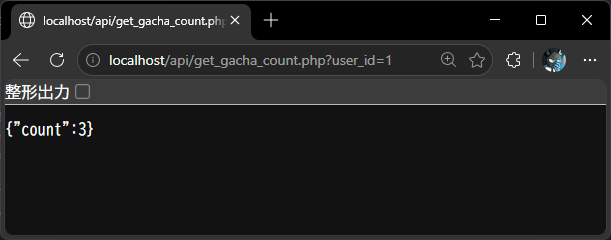

Which is the correct output we need. Don't forget to switch the これが求めていた正しい出力である。次のステップに進む前に、$_GET toを $_POST before we move onto the next step!に変更するのを忘れないでください。
Gacha pullガチャを引く
The next scrips executes the gacha pull. This is a bit more complex, as it needs to do a few things次のスクリプトは、ガチャを実際に引く処理を行う。いくつかの処理が必要になるので、少し複雑である。
Randomly generate a card rank from SS to CSSからCまでの中から、ランダムにカードのランクを決めるQuery the database for all cards of the selected rank決まったランクのカードを、すべてデータベースから取得する
Select 1 card randomlyその中から、ランダムに1枚を選ぶ
Add the card to the player's list of cards選んだカードを、プレイヤーの持っているカード一覧に追加するDecrease the number of gacha pulls by 1ガチャの残り回数を1減らすReturn to the game (新しく手に入れたカードの情報を、JSONでゲーム(Unity)a JSON with the newly obtained card側に返す
We can break this into 4 different functions and call them one at the time. Let's start with random card generation. Create a new script called この処理は、4つの関数に分けて順番に呼び出すことができる。まずは、ランダムにランクを決める処理から始めよう。gacha_pull.php という新しいスクリプトを作ってください。
Random card rank with probability確率でランダムにカードのランクを決める
// 確率によりランダムランクを作成
// 0:C ~ 4:SS
function createRandomRank()
{
	// 0~100までの乱数を生成
	$chance = rand(0, 100)

	// 5% 以下だったら、SSランク(4)のカードになる
	if ($chance < 5)
		return 4;

	// 15% 以下だったら、Sランク(3)のカードになる
	if ($chance < 15)
		return 3;

	// 35% 以下だったら、Aランク(2)のカードになる
	if ($chance < 35)
		return 2;

	// 65% 以下だったら、Bランク(1)のカードになる
	if ($chance < 65)
		return 1;

	// 残りは C(0)
	return 0;
}
This script generates a random number between 0 and 100 and then checks each cumulative probability until it finds a rank to return between 0 (このスクリプトは、0から100までのランダムな数を生成し、累積確率を順番にチェックしながら、0(C) andから 44(SS) (SS)までのランクを1つ見つけて返す。
Select random card from database with rankランクを指定してデータベースからランダムにカードを選ぶ
The next script takes a rank value from 0 to 4, queries the database and returns 1 random card record.次のスクリプトは、0から4までのランク値を受け取り、データベースを検索して、その中からランダムに1枚のカードのレコードを返す。
// ランクを用いて、ランダムのカードを返す
// $dbh:  データベースを検索するためのPDO
// $rank: カードのランク
function getCardWithRank($dbh, $rank)
{
    // SQL文を構築
    $sql = "SELECT * FROM cards WHERE rank = " . $rank;

    // すべてのレコードを取得
    $result = $dbh->query($sql);
    $records = $result->fetchAll();

    // ランダムのを選択
    $count = sizeof($records);
    $idx   = rand(0, $count-1);
    return $records[$idx];
}
Add the card to the playerプレイヤーにカードを追加する
In this step, we modify このステップでは、user_cards tableテーブルを更新して、プレイヤーの持っているカードを反映させる。もしプレイヤーがすでにそのカードを持っていたら、count toに1を足す必要がある。逆に、まだ持っていなければ、count update the cards the player has. If the player already had the card, we need to add 1 to the count. However, if the player never owned the card, we need to add a new record with a starting count of 1. Fortunately, を1として新しいレコードを追加する必要がある。幸い、SQL has a special statement for that calledには INSERT ... ON DUPLICATE. It's a bit complex to read, but it looks something like this:という特別な文がある。読むのは少し複雑だが、だいたい次のような形になる。
INSERT INTO table (カラム1, カラム2, ...) VALUES (値1, 値2, ..)
ON DUPLICATE KEY UPDATE カラム1 = 値1, カラム2 = 値2, ...
In this case, if a duplicate match is found, it will update instead of inserting a new record in the table. For that, however, we need to mark the non-duplicate fields as "UNIQUE". Before we can continue, let's open この場合、重複するレコードが見つかったら、新しく追加する代わりに更新される。ただし、そのためには、重複してはいけないフィールドを「UNIQUE」として指定しておく必要がある。続ける前に、phpMyAdmin andを開いて edituser_cards the user_cards table:テーブルを編集してみよう。
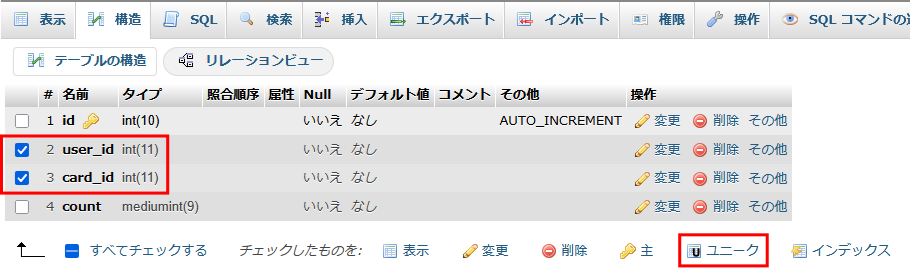
Selectuser_idとcard_id bothの両方を選択して、「UNIQUE」に設定してください。こうすることで、user_id user_idと andcard_id card_id and then mark them as "UNIQUE". This tells the database that there cannot be any records in which the user_id-card_id pair are repeated. So for exampleの組み合わせが重複するレコードは存在できないと、データベースに伝えることができる。例えば、
user_id = 3, card_id = 1
can coexist with は、
user_id = 3, card_id = 2
andや
user_id = 2, card_id = 1
since at least one field is different. Trying to add another record with と共存できる。少なくともどちらかのフィールドが違うからである。しかし、user_id = 3, card_id = 1 will result in an error and won't be added to the database, since that combination must be unique. We can confirm that set of these two columns must be unique:1というレコードをもう一度追加しようとすると、その組み合わせは一意でなければならないため、エラーになりデータベースには追加されない。この2つの列の組み合わせが一意であることは、次の画面で確認できる。
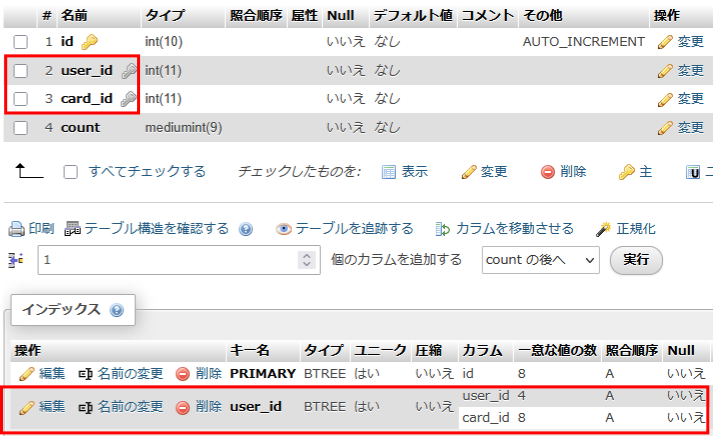
Since we have now a unique field, we can use the special一意なフィールドができたので、特別な INSERT ... ON DUPLICATE statement to either add or update depending whether the user / card pair exists or not like so (roughly):文を使って、ユーザーとカードの組み合わせが存在するかどうかによって、追加または更新を行うことができる。だいたい次のような形になる。
INSERT INTO user_cards (user_id, card_id, count) VALUES ($userID, $cardID, 1)
ON DUPLICATE KEY UPDATE count = count + 1
This statement will try to add a new user_idこの文は、新しいuser_id / card_id pair with a starting card_idの組み合わせを、count of= 1. But if it is a duplicate, it will increase count by 1. Now we can write our PHP function like so:1として追加しようとする。もし重複していたら、代わりにcountを1増やす。これで、次のようなPHP関数が書けるようになる。
// ユーザーにカードを追加する
// $dbh:    データベースを検索するためのPDO
// $userID: ユーザーID
// $cardID: カードID
function addCardToPlayer($dbh, $userID, $cardID)
{
    // SQL文を構築
    $sql = "INSERT INTO user_cards (user_id, card_id, count) "
         . "VALUES ($userID, $cardID, 1) "
         . "ON DUPLICATE KEY UPDATE count = count + 1";

    // 実行
    $result = $dbh->exec($sql);
}
Decreasing gacha countガチャの回数を減らす
Now that we added the card to the player, we can decrease the amount of gacha pulls available. This is a simpleカードをプレイヤーに追加できたので、次はガチャの残り回数を減らす。これは、単純な UPDATE statement:文で実現できる。
// ガチャの数を減らす
// $dbh:    データベースを検索するためのPDO
// $userID: ユーザーID
function decreaseGachaPullCount($dbh, $userID)
{
    // SQL文を構築
    $sql = "UPDATE gacha SET count = count - 1 "
         . "WHERE user_id = " . $userID;

    // 実行
    $result = $dbh->exec($sql);
}
Putting it all togetherまとめる
Now all we need to do is run all the functions and return the card to the player through JSON. あとは、これまで作った関数をすべて実行して、手に入れたカードの情報をJSONでプレイヤーに返すだけである。
// JSONを返すべき
header("Content-Type: application/json; charset=utf-8");

// 接続
$dbh = new PDO('mysql:host=localhost; dbname=card_game', "root", "", [PDO::ATTR_PERSISTENT => true]);

// ユーザーID
$userID = $_POST['user_id'];

$rank = createRandomRank();
$card = getCardWithRank($dbh, $rank);
addCardToPlayer($dbh, $userID, $card['id']);
decreaseGachaPullCount($dbh, $userID);

// カード情報を返す
$json['card']['id']           = $card['id'];
$json['card']['rank']         = $card['rank'];
$json['card']['picture_id']   = $card['picture_id'];
$json['card']['monster_name'] = $card['monster_name'];
$json['card']['atk_value']    = $card['attack'];
$json['card']['def_value']    = $card['defense'];
$json['card']['hp_value']     = $card['hit_points'];

print(json_encode($json));
The entire script is here.スクリプト全体はこちらである。
Unityを使い、APIとの接続
Now we work on the Unity side. Let's create two API requests first, one for each PHP function:次は、Unity側の作業に移る。まず、それぞれのPHP関数に対応するAPIリクエストを2つ作ろう。
APIRequest
Gacha count:ガチャの回数取得
// ガチャの回数を返す
// userID:ユーザーID
public static async Awaitable<int> GetGachaCountAsync(string userID)
{
    // POSTでデータを準備
    var postData = new WWWForm();
    postData.AddField("user_id", userID);

    // APIのURLへリクエストを送信
    const string url = ServerAPI + "/get_gacha_count.php";
    var webRequest = UnityWebRequest.Post(url, postData);

    // 返事を待機する
    await webRequest.SendWebRequest();

    // 返事の文字列を取得
    var webResponse = webRequest.downloadHandler.text;

    // JSONからPlayerCardの配列へ変換
    JObject response = JObject.Parse(webResponse);

    // 返す
    return (int)response["count"];
}
Gacha pull:ガチャを引く
// ガチャを引く
// userID:ユーザーID
public static async Awaitable<JObject> GachaPullAsync(string userID)
{
    // POSTでデータを準備
    var postData = new WWWForm();
    postData.AddField("user_id", userID);

    // APIのURLへリクエストを送信
    const string url = ServerAPI + "/gacha_pull.php";
    var webRequest = UnityWebRequest.Post(url, postData);

    // 返事を待機する
    await webRequest.SendWebRequest();

    // 返事の文字列を取得
    var webResponse = webRequest.downloadHandler.text;

    // JSONからPlayerCardの配列へ変換
    JObject response = JObject.Parse(webResponse);

    // 返す
    return (JObject)response["card"];
}
GachaController
Gacha countガチャの回数
Next we need to update 次に、GachaController.cs. This script right now is just playing the animation, but it is not connected to the server. Let's update it so it uses the API to check for the number of pulls available and execute as many times as we are allowed to do it.を更新する必要がある。このスクリプトは今のところアニメーションを再生するだけで、サーバーとはつながっていない。APIを使って残り回数を確認し、その回数分だけガチャを引けるように更新していこう。
In UpdateGachaCountAsync() replace these linesの中にある、次の行を置き換えてください。
// 未実装:サーバーに依頼し、数を取得
await Awaitable.NextFrameAsync();
int count = 1; // とりあえず固定
with the API call:APIの呼び出しに置き換える。
// サーバーに依頼し、数を取得
int count = await APIRequest.GetGachaCountAsync(LoginController.UserID);
Try it on Unity and see we correctly receive "3" pulls as we set it in the database.Unity上で試してみて、データベースで設定した通り「3」回が正しく取得できるか確認してください。
Gacha pullガチャを引く
Finally, we need to connect the pull API with最後に、ガチャを引くAPIを GachaController, and update the card display to show the result. Since the API returns the card information in the same format that とつなげて、結果をカード表示に反映させる必要がある。APIが返すカード情報は、CardDisplay expects it, we can tie it up fairly simply:が期待している形式とちょうど同じなので、わりと簡単につなげることができる。
In PullGachaAsync() replace these lines:の中にある、次の行を置き換えてください。
// 未実装:サーバーに依頼し、ガチャを引き、
//        カードを更新する
await Awaitable.NextFrameAsync();
With these:次のように置き換える。
//サーバーに依頼し、ガチャを引き、カードを更新する
JObject data = await APIRequest.GachaPullAsync(LoginController.UserID);
card.SetData(data);
All we have to do left is just play the gacha game! Pull 3 times until we run out of pulls, then go back to the card list to check we have our new cards!あとは、実際にガチャゲームを遊ぶだけである!回数が無くなるまで3回引いてみて、それからカード一覧に戻って、新しいカードが増えているか確認してください!