
3Dモデルの仕組み(その1)
今まで、FBXファイルでモデルをダウンロードし、そのまま使ってきましたが、実際にどう作られているのか調べてみましょう。
頂点(Vertex / バーテックス)
頂点は3D空間の「ある位置」を表している。普通、3次元ベクトルとして表現する。この位置を適切に繋がることにより、3Dの形状を作成できる。例えば、普通の立方体は頂点は8点がある:
|
|
頂点の配列
|
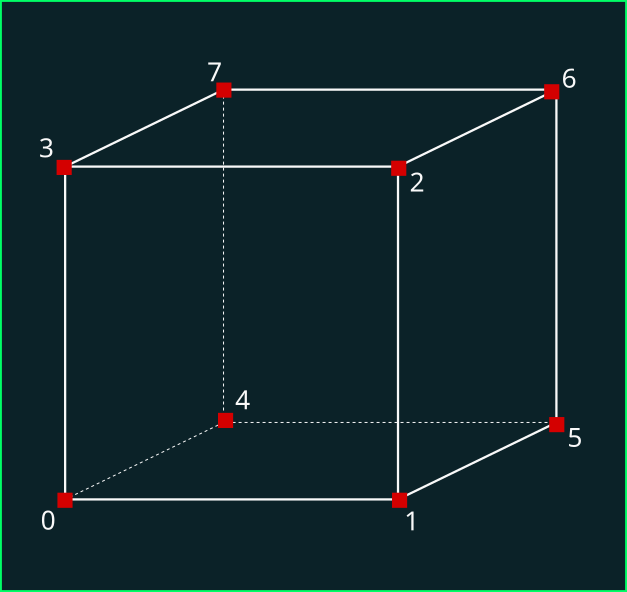
Unityの場合は「Vertex3」型の配列で頂点を作成ができる。それぞれの頂点に「指数」(Index)を割り当てる必要がある。上の図だと、「0〜7」の指数をアサインした。ただし、必要に応じて、同じ頂点を重複する必要な場合もある。このときは、同じ位置に複数の頂点があり、それぞれが別々の指数を持っている。
|
|
頂点の配列
|
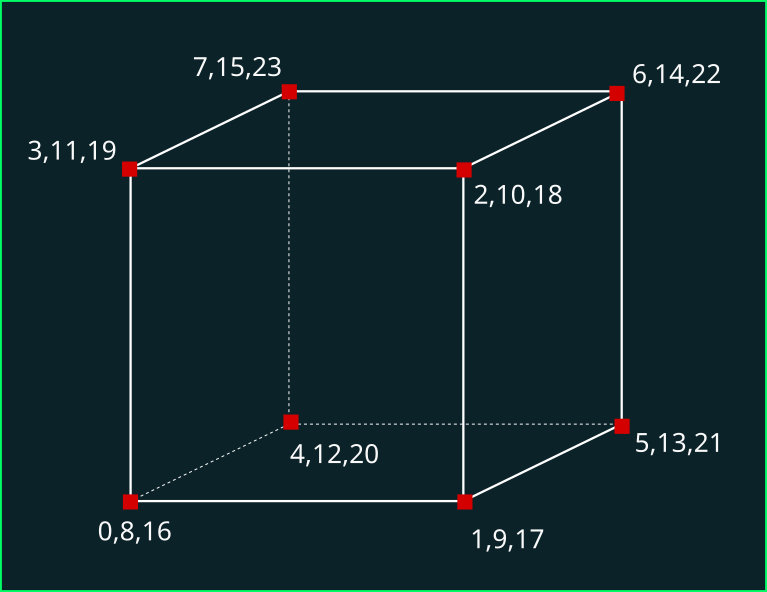
ここでは、各面は自分の頂点を持ち、隣の面と共有しない。つまり、この場合は6面 × 4点=24点である。
練習
MyCube スクリプトを作成して…
Vector3型の配列「vertices」を宣言
CreateVertices() メソッドを作成し、上記の頂点の配列を作成
Awake() メソッドの中に CreateVertices() を呼び出す ※ Awake は Start よりも一歩早く走る
MyCube スクリプト
// 立方体
public class MyCube : MonoBehaviour
{
	// 頂点の配列
	private Vector3[] vertices;

	// Awake は Start よりも一歩早く実行する
	// 内部初期化(他のコンポーネントに依存しない)ときにはおすすめ
	private void Awake()
	{
		CreateVertices();
	}

	// 頂点を作成する
	private void CreateVertices()
	{
		vertices = new Vector3[24];

		vertices[0] = new Vector3(-1, -1, -1);
		vertices[1] = new Vector3(1, -1, -1);
		vertices[2] = new Vector3(1, 1, -1);
		vertices[3] = new Vector3(-1, 1, -1);
		vertices[4] = new Vector3(-1, -1, 1);
		vertices[5] = new Vector3(1, -1, 1);
		vertices[6] = new Vector3(1, 1, 1);
		vertices[7] = new Vector3(-1, 1, 1);

		vertices[8] = new Vector3(-1, -1, -1);
		vertices[9] = new Vector3(1, -1, -1);
		vertices[10] = new Vector3(1, 1, -1);
		vertices[11] = new Vector3(-1, 1, -1);
		vertices[12] = new Vector3(-1, -1, 1);
		vertices[13] = new Vector3(1, -1, 1);
		vertices[14] = new Vector3(1, 1, 1);
		vertices[15] = new Vector3(-1, 1, 1);

		vertices[16] = new Vector3(-1, -1, -1);
		vertices[17] = new Vector3(1, -1, -1);
		vertices[18] = new Vector3(1, 1, -1);
		vertices[19] = new Vector3(-1, 1, -1);
		vertices[20] = new Vector3(-1, -1, 1);
		vertices[21] = new Vector3(1, -1, 1);
		vertices[22] = new Vector3(1, 1, 1);
		vertices[23] = new Vector3(-1, 1, 1);
	}
}
三角形(Triangle)
頂点3点を繋がると三角形(Triangle)を作ることができ、三角形の群は「メッシュ」(Mesh)という。
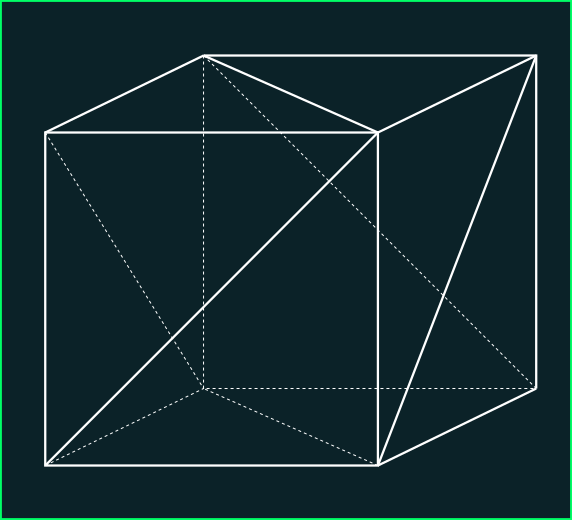
三角形を作成するときに、次の点を考慮しないといけない:
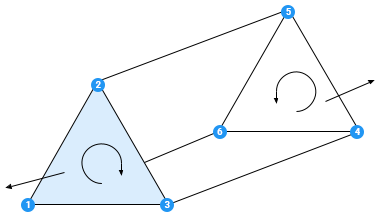
① 頂点の順番(三角形は時計回りか?逆時計回りか?)
3つの頂点の繋がり方は2つある:時計回り(Clockwise - CW)と反時計回り(Counter - Clockwise - CCW)。ゲーム開発では、この順番はとても重要である。これは「Winding Order」(巻き順)という。
ゲームエンジンの最適化と高速化のため、無駄な面(三角形)を計算処理から抜いた方が良いでしょう。普通、カメラに映らない面(カメラの後ろにあるもの)を計算から抜く。また、カメラに向いていない面(三角形の裏側)も、計算から抜くことが一般である。
三角形の「表」と「裏」が分かるには、頂点の順番を使う。Unityの場合は「時計回りの三角形は表面である」となっているが、別のエンジンは逆になる可能性があるので、注意してください。
② 頂点を共有するか?別々にするのか?
2枚の三角形は1つの辺が接着しているときに、2つの選択しがある:
- 同じ頂点を使いまわし、共有する
- 頂点を重複し、面を作成するとき、別々の頂点を使う
とくにどれにするかは別にルールがなく、ゲームでやりたいことにより、適切な繋がり方を選ぶべきが、一般的には:
- なめらかなカーブを表現しようとし、同じ面であるとき→頂点を共有する(連続する面)
- 例:キャラクター、服装、植物、動物
- 硬い角を持っているオブジェ、別の面であるとき→別々の頂点にする(連続しない面)
- 例:壁、さいころ、ブロック、かくかくしかじかの形
ならば、普通の立方体の繋がりは、以下のようになる:
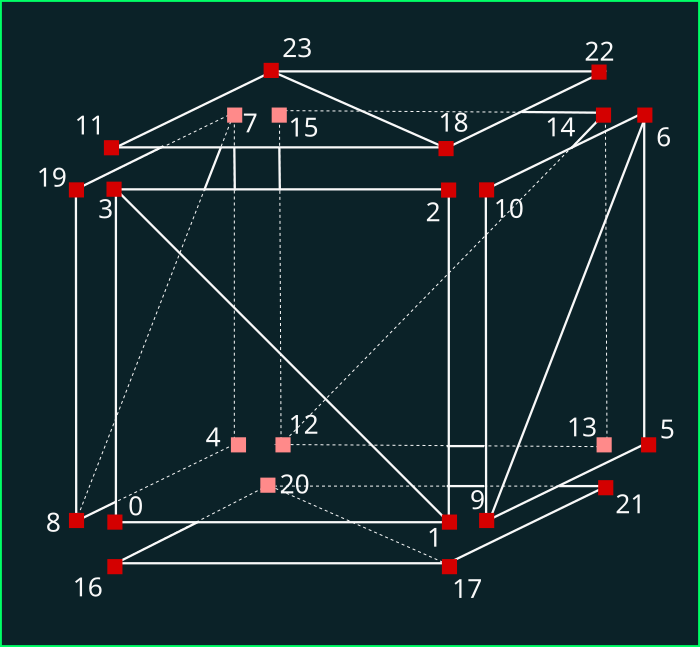
各面が自分の頂点を持っているが、同じ面の三角形は頂点を共有する
練習
MyCube スクリプトを拡張して…
triangles の 整数型の配列を宣言
CreateTriangles() のメソッドを作成し、図のように3つの指数ごとに三角形を作成
triangles[0] = 0;triangles[1] = 3;triangles[2] = 1;
Awake() で CreateTriangles() を呼び出す
MyCube スクリプト(編集分)
// 三角形の配列
private int[] triangles;

// Awake は Start よりも一歩速く実行する
// 内部初期化(他のコンポーネントに依存しない)ときにはおすすめ
private void Awake()
{
	CreateVertices();
	CreateTriangles();
}

// 三角形を作成する
private void CreateTriangles()
{
	int[] triangles = new int[36];
	int i = 0;

	// 前
	triangles[i++] = 0;
	triangles[i++] = 3;
	triangles[i++] = 1;

	triangles[i++] = 1;
	triangles[i++] = 3;
	triangles[i++] = 2;

	// 右
	triangles[i++] = 9;
	triangles[i++] = 10;
	triangles[i++] = 6;

	triangles[i++] = 9;
	triangles[i++] = 6;
	triangles[i++] = 5;

	// 下
	triangles[i++] = 20;
	triangles[i++] = 16;
	triangles[i++] = 17;

	triangles[i++] = 20;
	triangles[i++] = 17;
	triangles[i++] = 21;

	// 左
	triangles[i++] = 7;
	triangles[i++] = 8;
	triangles[i++] = 4;

	triangles[i++] = 7;
	triangles[i++] = 19;
	triangles[i++] = 8;

	// 後ろ
	triangles[i++] = 14;
	triangles[i++] = 12;
	triangles[i++] = 13;

	triangles[i++] = 14;
	triangles[i++] = 15;
	triangles[i++] = 12;

	// 上
	triangles[i++] = 18;
	triangles[i++] = 11;
	triangles[i++] = 23;

	triangles[i++] = 18;
	triangles[i++] = 23;
	triangles[i++] = 22;
}
メッシュ(Mesh)
メッシュは三角形の群である。メッシュはあくまで「形状」を定義し、色や模様は別途で作成しなければならない(シェーダーのときにまた学ぼう!)
Unityでは「Mesh」というクラスがある。この「Mesh」クラスは、頂点と三角形を定義するクラスである。また、光の計算のための「法線ベクトル」や模様を貼り付けるための「UV座標」も持っている(これもシェーダーの時に学ぼう)
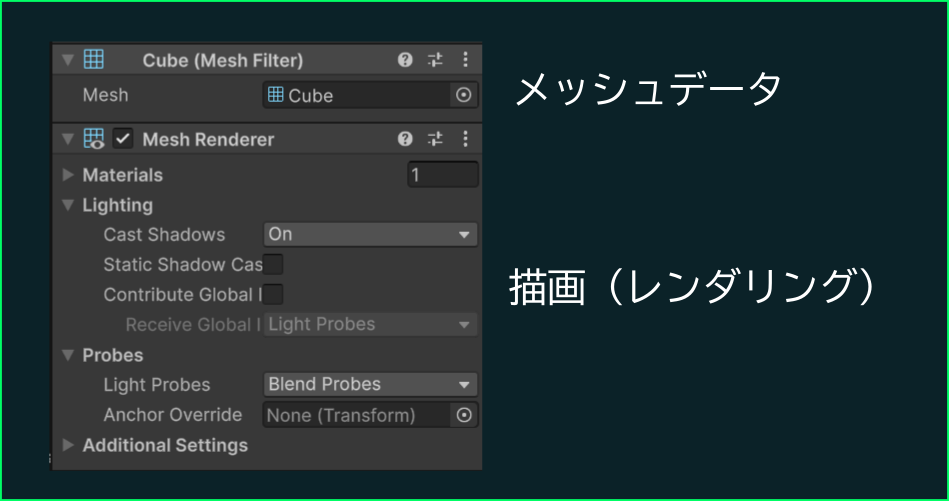
メッシュができたら、「MeshFilter」コンポーネントに渡し、「MeshRenderer」で描画する。
練習
「MyCube」クラスを作成し
メッシュを作成しMeshを作成立方体の頂点を作成
verticesとtriangles頂点をつなげて、三角形を作成
Awakeで 実行中に MeshFilter と MeshRenderer を追加し、描画する。
MyCube スクリプトスクリプト(完成)
using UnityEngine;

// 立方体のメッシュを作成し、描画する
public class MyCube : MonoBehaviour
{
	// 立方体のマテリアル
	[SerializeField]
	private Material material;

	// 頂点の配列
	private Vector3[] vertices;

	// 三角形の配列
	private int[] triangles;

	// 作成したメッシュ
	private Mesh mesh;

	// Awake は Start よりも一歩速く実行する
	// 内部初期化(他のコンポーネントに依存しない)ときにはおすすめ
	private void Start(Awake()
	{
		CreateMesh(CreateVertices();
		CreateTriangles();

		mesh = new Mesh();
		mesh.vertices = vertices;
		mesh.triangles = triangles;
		mesh.RecalculateNormals(); // 法線ベクトルを自動計算(※)

		// ゲームオブジェクトにMeshFilterを追加
		MeshFilter mf = gameObject.AddComponent<MeshFilter>();
		mf.mesh = mesh;

		// MeshRendererも追加
		MeshRenderer mr = gameObject.AddComponent<MeshRenderer>();
		mr.material = material;
	}

	// メッシュを作成し、MeshFilterに割り当てる頂点を作成する
	private void CreateMesh(CreateVertices()
	{
		// メッシュを作成
		mesh = new Mesh();

		//頂点を作成し、設定する
		mesh.vertices = CreateVertex();

		// 三角形を作成し、設定する
		mesh.triangles = CreateTriangle();

		// 自動的に法線ベクトルを計算
		mesh.RecalculateNormals();
	}

	// 頂点を作成する
	// 返す:頂点の配列
	private Vector3[] CreateVertex()
	{
		Vector3[] vertex = new Vector3[24];

		vertex[vertices[0] = new Vector3(-1, -1, -1);
		vertex[vertices[1] = new Vector3(1, -1, -1);
		vertex[vertices[2] = new Vector3(1, 1, -1);
		vertex[vertices[3] = new Vector3(-1, 1, -1);
		vertex[vertices[4] = new Vector3(-1, -1, 1);
		vertex[vertices[5] = new Vector3(1, -1, 1);
		vertex[vertices[6] = new Vector3(1, 1, 1);
		vertex[vertices[7] = new Vector3(-1, 1, 1);

		vertex[vertices[8] = new Vector3(-1, -1, -1);
		vertex[vertices[9] = new Vector3(1, -1, -1);
		vertex[vertices[10] = new Vector3(1, 1, -1);
		vertex[vertices[11] = new Vector3(-1, 1, -1);
		vertex[vertices[12] = new Vector3(-1, -1, 1);
		vertex[vertices[13] = new Vector3(1, -1, 1);
		vertex[vertices[14] = new Vector3(1, 1, 1);
		vertex[vertices[15] = new Vector3(-1, 1, 1);

		vertex[vertices[16] = new Vector3(-1, -1, -1);
		vertex[vertices[17] = new Vector3(1, -1, -1);
		vertex[vertices[18] = new Vector3(1, 1, -1);
		vertex[vertices[19] = new Vector3(-1, 1, -1);
		vertex[vertices[20] = new Vector3(-1, -1, 1);
		vertex[vertices[21] = new Vector3(1, -1, 1);
		vertex[vertices[22] = new Vector3(1, 1, 1);
		vertex[vertices[23] = new Vector3(-1, 1, 1);
	return vertex;
	}

	// 三角形を作成する
	// 返す:三角形の配列(頂点の指数を3個ずつ)
	private int[]void CreateTriangle(CreateTriangles()
	{
		int[] tritriangles = new int[36];
		int i = 0;

		// 前
		tri[triangles[i++] = 0;
		tri[triangles[i++] = 3;
		tri[triangles[i++] = 1;

		tri[triangles[i++] = 1;
		tri[triangles[i++] = 3;
		tri[triangles[i++] = 2;

		// 右
		tri[triangles[i++] = 9;
		tri[triangles[i++] = 10;
		tri[triangles[i++] = 6;

		tri[triangles[i++] = 9;
		tri[triangles[i++] = 6;
		tri[triangles[i++] = 5;

		// 下
		tri[triangles[i++] = 20;
		tri[triangles[i++] = 16;
		tri[triangles[i++] = 17;

		tri[triangles[i++] = 20;
		tri[triangles[i++] = 17;
		tri[triangles[i++] = 21;

		// 左
		tri[triangles[i++] = 7;
		tri[triangles[i++] = 8;
		tri[triangles[i++] = 4;

		tri[triangles[i++] = 7;
		tri[triangles[i++] = 19;
		tri[triangles[i++] = 8;

		// 後ろ
		tri[triangles[i++] = 14;
		tri[triangles[i++] = 12;
		tri[triangles[i++] = 13;

		tri[triangles[i++] = 14;
		tri[triangles[i++] = 15;
		tri[triangles[i++] = 12;

		// 上
		tri[triangles[i++] = 18;
		tri[triangles[i++] = 11;
		tri[triangles[i++] = 23;

		tri[triangles[i++] = 18;
		tri[triangles[i++] = 23;
		tri[triangles[i++] = 22;
	return tri;
	}
}