
各種の変換(トランスフォーム)
今まで、物体の移動(位置)、回転と拡大縮小をUnityの「transform」コンポーネントを使ってやってきました。
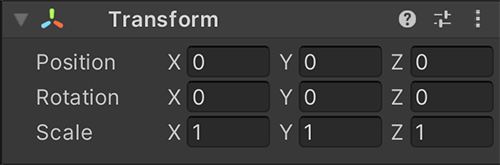
実は裏側でなにが行われているのか、学んでいきましょう。
移動(位置)
一番簡単なのは、「移動」(位置)である。基本的に、メッシュの各頂点を移動させたい量を足すだけで実現できる。学んできた「ベクトルの足し算」を使えば、すぐ実装できる:
|
|
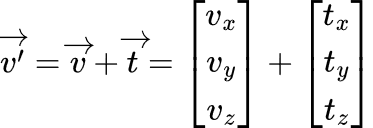
ここで「v'」は移動した頂点で、「v」は元の頂点で、「t」は移動ベクトルである。
練習
MyTransform のスクリプトを作成し、MyCube で作った立方体を移動する。
- 頂点の位置を変えないとけいないので、MyCube の頂点を読み込む(
GetVertices)、書き込むメソッド(SetVertices)を作成してください。 GetVerticesは頂点配列のコピーを返してください :return (Vector3[])vertices.Clone();
GetComponent で取得し、頂点を変換する。
Translate(Vector3[] vertices)で移動を実装
Updateで
Translateで移動
変換した頂点を設定
MyCube の GetVertices と SetVertices
// メッシュの頂点を返す
public Vector3[] GetVertices()
{
	// 元々の頂点データを守りたいので、コピーを返す
	return mesh.vertices;(Vector3[])vertices.Clone();
}

// メッシュの頂点を設定
public void SetVertices(Vector3[] vertices)
{
	mesh.vertices = vertices;
	mesh.RecalculateNormals(); // 方法ベクトル再計算
}
MyTransform スクリプト
// メッシュの頂点を返す自分で作った変換(Transform)コンポーネント
public Vector3[]class GetVertices(MyTransform : MonoBehaviour
{
    // 位置・移動量
    [SerializeField]
    private Vector3 position;

    // 立方体
    private MyCube cube;

    private void Start()
    {
        return// mesh.vertices;MyCubeを取得し、変換する前の頂点を保管しておく
        cube = GetComponent<MyCube>();
    }

    private void Update()
    {
        // 頂点を取得
        Vector3 [] vertices = cube.GetVertices();

        // 移動を適用
        Translate(vertices);

        // 変換した頂点を適用
        cube.SetVertices(vertices);
    }

    // メッシュの頂点を設定頂点を移動する
    publicprivate void SetVertices(Translate(Vector3[] vertices)
    {
        mesh.vertices// 1個ずつを処理
        for (int i = vertices;0; mesh.RecalculateNormals(i < vertices.Length; i++);
        {
            // 方法ベクトル再計算ベクトルの加算で移動を実現!
            vertices[i] = vertices[i] + position;
        }
    }
}